Full Screen Button icon

Full Screen Button Chrome Extension Analysis

Tab & Bookmark Productivity

Chrome extension ID: iokdoigdonjidoklkaonhielnkamibnp

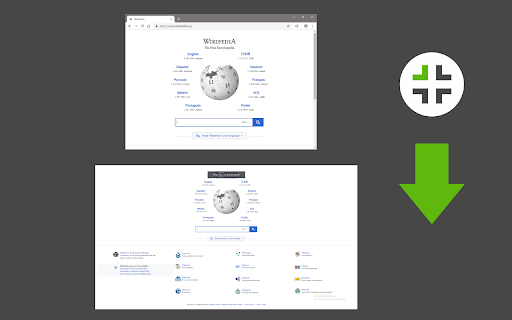
This browser extension provides a one-click button to trigger full-screen mode for the active tab. It includes an optional feature to prioritize maximizing video elements when playing media and provides specific window state handling upon exiting full-screen mode.

Developer:Sevina
Version:0.1.4
Size:31.97KiB
Last updated:

Overview

Installs

9K+

Rating

★ 4.7

68 reviews

Languages

1 locales

Includes English

Market analysis

Review-backed positioning, friction, and market signals for this Chrome extension.

Backed by review samples

Macro category

Tab & Bookmark Productivity

Pricing friction

Low review signal

Complaint intensity

Moderate review signal

Listing & review signals
Observed signals from store listing text and review samples.

Listing positioning

Full Screen Button positions itself as a lightweight utility for instantly toggling full-screen mode in the browser. It offers specialized control over video elements and aims to solve persistent window management issues encountered during standard full-screen use.

Inferred product pattern

Single-purpose browser utility providing a UI toggle for full-screen mode with basic window state persistence.

Review-backed pain points

Users report conflicts with site-specific full-screen players, unexpected exiting of full-screen on page navigation, and difficulties configuring keyboard shortcuts in specific browsers like Brave.

Observed feature gaps

Lack of granular keyboard shortcut remapping, issues with PDF full-screen support, and conflicts with some third-party UI/New Tab extensions.

Tags
Full ScreenBrowser UtilitiesDisplay ManagementProductivity
Target users

- Power users

- Media consumers

- Browser customization enthusiasts

Primary use cases

- Hiding browser UI toolbars

- Maximizing video playback area

- Preserving window size after exiting full-screen

Positive themes

- Maintains window maximization after exit

- Fixes native Chrome/browser full-screen window sizing quirks

- Simple and unobtrusive functionality

Negative themes

- Interferes with native website full-screen controls (e.g., YouTube)

- Hard-coded behaviors causing tab-switching issues

- Incompatibility with certain new-tab extensions

- Limited customization for keyboard shortcuts

Observed friction

- Performance complaints detected

- No pricing friction observed; the extension is free to use.

Evidence boundary: Analysis based on public store description and user reviews highlighting both the utility's success in window management and technical conflicts with native site functions. Review data shows a mix of satisfied users praising window state fixes and frustrated users reporting UI interference, representing a subset of the total user base.
Complaint summaries
Review-backed complaint signals grouped by operational area.

Support

Users expressed a desire for more robust configuration options rather than specific complaints about developer support.

Reliability

Reports exist regarding interference with standard browser UI and issues with the extension toggling off unexpectedly during navigation.

Privacy

No privacy or security complaints identified.

Access & pricing

- Free usage observed

- No account requirement observed

- Free plan or free usage claimed

Store listing facts

Listing assets

- Screenshots: 1

- Videos: 0

- Languages: 1

Trust signals

- Privacy policy

- Developer contact

- Official website

Store metadata

- Version: 0.1.4

- Size: 31.97KiB

- Last updated:

Listing SEO keywords

Search intent keywords
Keyword signals for evaluating how users may discover, compare, or search for this extension category.

Core discovery

browser full screen extensionmaximize tab utilityfull screen button chrome

Comparison

F11 keyboard alternativebrowser window manager

Problem

browser window not maximizingexit full screen issues

Alternative

chrome full screen toggleauto-maximize browser window

Similar extensions

Jump to related discovery paths:

Screenshots

Full Screen Button screenshot

Links

Recommended Chrome extensions

Related listings from the same category, trending peers, and the same publisher portfolio.

Browse tools
Text Editor icon

Text Editor

Sevina

A free, highly customizable text and code editor extension for your browser.

Installs

90K+

Rating

★ 3.9

Text to Speech (TTS) icon

Text to Speech (TTS)

Sevina

A text to speech tool with natural sounding voices.

Installs

60K+

Rating

★ 3.1

PrintFriendly: Print, PDF Editor & Full Page Screenshot icon

PrintFriendly: Print, PDF Editor & Full Page Screenshot

PrintFriendly

Print clean web pages, save as PDF, edit PDFs, and capture full-page screenshots. Integrates with ChatGPT, Claude, and Gemini.

Installs

1.0M+

Rating

★ 4.9

NaturalReader - AI Text to Speech icon

NaturalReader - AI Text to Speech

NaturalSoft Limited

NaturalReader reads text aloud on the pages you browse, including emails, online documents, PDFs and ebooks.

Installs

1.0M+

Rating

★ 4.1

Kimi icon

Kimi

Kimi

Kimi Browser Extension — for AI agents. AI can open pages, click, fill forms, extract info, and automate web tasks.

Installs

1.0M+

Rating

★ 3.9

Chat with all AI models (Gemini, Claude, DeepSeek…) & AI Agents | AITOPIA icon

Chat with all AI models (Gemini, Claude, DeepSeek…) & AI Agents | AITOPIA

AITOPIA AI Sidebar

AI Agent Marketplace & AI Sidebar with all AI models (Gemini, Claude, DeepSeek & more) and hundreds of AI Agents

Installs

1.0M+

Rating

★ 4.8

BlockSite Block Websites & Stay Focused icon

BlockSite Block Websites & Stay Focused

BlockSite

Stay focused and boost productivity: Custom blocklist, Scheduled site blocking, and Password protection.

Installs

1.0M+

Rating

★ 4.5

Screen Recorder & Screenshot App for Chrome | Scrnli icon

Screen Recorder & Screenshot App for Chrome | Scrnli

scrnli

Screen recorder for Chrome: capture, edit, share screenshots and videos instantly

Installs

1.0M+

Rating

★ 4.8

AIPRM for ChatGPT icon

AIPRM for ChatGPT

AIPRM

AIPRM is your cheat code for ChatGPT. Adds a list of curated prompt templates and advanced features. Try today.

Installs

1.0M+

Rating

★ 4.4

Britannica School Insights icon

Britannica School Insights

Encyclopædia Britannica

Are you a Britannica School subscriber?

Installs

1.0M+

Rating

★ 3.1