Copycat icon

Copycat Chrome Extension Analysis

Automation & Workflow Efficiency

Chrome extension ID: jdjbiojkklnaeoanimopafmnmhldejbg

This extension enhances the browser's native copy functionality by allowing users to copy web content in specific data formats. It includes options for customizing output and mapping commands to browser shortcuts for faster workflows.

Developer:BlackGlory
Version:3.1.7
Size:1.25MiB
Last updated:

Overview

Installs

10K+

Rating

★ 4.6

57 reviews

Languages

2 locales

Includes English, 中文(中国)

Market analysis

Review-backed positioning, friction, and market signals for this Chrome extension.

Backed by review samples

Macro category

Automation & Workflow Efficiency

Pricing friction

Low review signal

Complaint intensity

Low review signal

Listing & review signals
Observed signals from store listing text and review samples.

Listing positioning

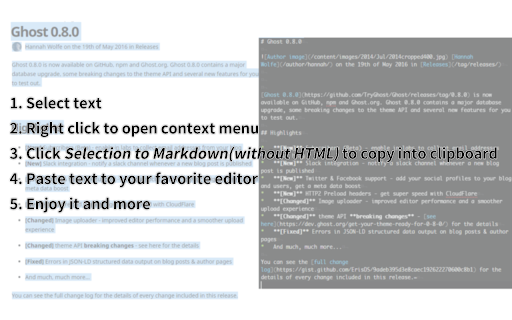
Copycat positions itself as a comprehensive utility for advanced content copying, supporting a wide range of formats like Markdown, HTML, and JSON. It emphasizes versatility by providing context-aware copying for tabs, frames, links, images, and selections via a right-click menu.

Inferred product pattern

A high-utility, open-source-backed browser developer tool focused on formatting clipboard data.

Review-backed pain points

Users occasionally encounter issues when copying from specific non-standard web pages or complex dynamic UI elements like ChatGPT code blocks, leading to inconsistent formatting.

Observed feature gaps

Reviewers have requested better parsing for language-specific tags in code blocks and native support for additional document formats like AsciiDoc.

Tags
Copy-PasteMarkdownFormattingWeb ClipperDeveloper Tool
Target users

- Developers

- Content Writers

- Note-takers

- Technical Researchers

Primary use cases

- Copying web content to Markdown for documentation

- Transferring code snippets to code libraries

- Converting HTML tables and text into clean clipboard data

Positive themes

- Accurate conversion to Markdown

- High-quality handling of code blocks and tables

- Reliable alternative to standard web clippers

- Efficiency for note-taking workflows

Negative themes

- Occasional failure on specific internal pages like OneTab

- Minor bugs in output formatting

- Lack of specialized code-block parsing for certain UI elements

Observed friction

- None identified; the tool is described as free to use.

Evidence boundary: Evidence is derived from user reviews highlighting utility for technical workflows and specific formatting capabilities, alongside documentation of minor parsing bugs. The sample size is small, and feedback is primarily from technical users; user experience on generic or non-technical websites is less represented.
Complaint summaries
Review-backed complaint signals grouped by operational area.

Support

None observed; users generally describe the tool as a 'perfect' utility.

Reliability

Occasional reports of the extension failing on specific browser versions or non-standard pages, though these are infrequent.

Privacy

No privacy or security concerns mentioned in the available feedback.

Access & pricing

- Free usage observed

- No account requirement observed

- Free plan or free usage claimed

Store listing facts

Listing assets

- Screenshots: 1

- Videos: 0

- Languages: 2

Trust signals

- Developer contact

- Official website

- Support link

Store metadata

- Version: 3.1.7

- Size: 1.25MiB

- Last updated:

Listing SEO keywords

Search intent keywords
Keyword signals for evaluating how users may discover, compare, or search for this extension category.

Core discovery

Copy as MarkdownCopy HTML as TextClipboard Manager extensionWeb to Markdown converter

Comparison

Bear app clipper alternativeCopy as Markdown extension

Problem

broken clipboard formattingmanual formattingweb to markdown conversion

Alternative

Copy as MarkdownMarkdown Here

Similar extensions

Jump to related discovery paths:

Screenshots

Copycat screenshot

Links

Recommended Chrome extensions

Related listings from the same category, trending peers, and the same publisher portfolio.

Browse workflow
Favicon Detector icon

Favicon Detector

BlackGlory

A simple way to detect website icons.

Installs

6K+

Rating

★ 4.8

Microsoft Defender Browser Protection icon

Microsoft Defender Browser Protection

Microsoft Corporation

Protect yourself against online threats, like phishing and malicious websites, with real-time protection from Microsoft.

Installs

3.0M+

Rating

★ 3.1

Content Server Browser Web Extension icon

Content Server Browser Web Extension

OpenText Corporation

Content Server Browser Web Extension for Chrome

Installs

3.0M+

Rating

★ 2.8

金山收藏助手 icon

金山收藏助手

金山收藏助手

一键收藏,永久保存网页正文或片段到金山文档

Installs

2.0M+

Rating

★ 4.7

Evernote Web Clipper icon

Evernote Web Clipper

Evernote

Use the Evernote extension to save things you see on the web into your Evernote account.

Installs

2.0M+

Rating

★ 4.5

Scribe: AI Documentation, SOPs & Process Intelligence icon

Scribe: AI Documentation, SOPs & Process Intelligence

chrome-store-admins

Turn any workflow into documentation your teams and AI agents can follow. Save each team member 35 hours/month.

Installs

2.0M+

Rating

★ 4.4

Momentum icon

Momentum

Momentum

Transform your browser into a beautifully designed tab that helps you feel calm, keep focus, and stay energized.

Installs

2.0M+

Rating

★ 4.2

Google Scholar PDF Reader icon

Google Scholar PDF Reader

scholar-chrome-extensions

Supercharge your paper reading: follow references, skim outline, jump to figures, cite and save.

Installs

2.0M+

Rating

★ 4.0

Pop up blocker for Chrome™ - Poper Blocker icon

Pop up blocker for Chrome™ - Poper Blocker

dingosolutions

Block popups, ads, cookie requests, trackers, notifications, ads on social media & more. A clean browsing experience starts today.

Installs

2.0M+

Rating

★ 4.5

AI Grammar Checker & Paraphraser – LanguageTool icon

AI Grammar Checker & Paraphraser – LanguageTool

lt-extension-publisher

Instantly Enhance Your Texts with LanguageTool’s Grammar Checker and Paraphrasing Tool

Installs

2.0M+

Rating

★ 3.3