Dark mode for Google™ Docs icon

Dark mode for Google™ Docs Chrome Extension Analysis

Automation & Workflow Efficiency

Chrome extension ID: jjgfcpnblnoedjnepaapnonoklgafpfb

A Chrome extension that transforms the bright white interface of Google Docs into a dark theme. It aims to prevent eye fatigue by modifying the background colors and styling of document editing environments.

Version:1.3.4
Size:20.19KiB
Last updated:

Overview

Installs

60K+

Rating

★ 3.7

179 reviews

Languages

1 locales

Includes English

Market analysis

Review-backed positioning, friction, and market signals for this Chrome extension.

Backed by review samples

Macro category

Automation & Workflow Efficiency

Pricing friction

Low review signal

Complaint intensity

High review signal

Listing & review signals
Observed signals from store listing text and review samples.

Listing positioning

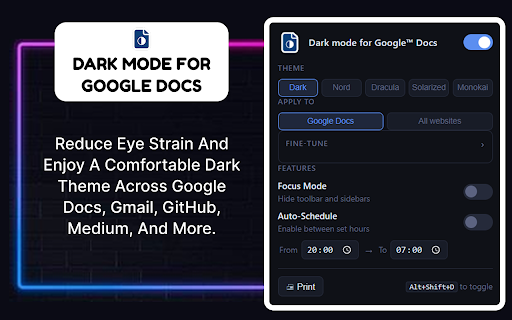
The product is positioned as a tool to reduce eye strain and blue light exposure during long sessions in Google Docs. It emphasizes productivity in low-light conditions and claims to offer theme presets, focus mode, and broad compatibility across other sites like Gmail and GitHub.

Inferred product pattern

A niche utility tool that attempted to expand its scope to multiple websites, resulting in a loss of stability and specificity.

Review-backed pain points

Users report that recent updates have broken the UI, making text and menus invisible (dark on dark) and applying a crude color inversion to all websites rather than specifically targeting Google Docs.

Observed feature gaps

Lack of granular site-specific controls and a missing communication channel for reporting bugs to the developer.

Tags
Dark ModeGoogle DocsEye Strain ReductionUI Customization
Target users

- Google Docs power users

- Night-shift workers

- Users with light sensitivity

Primary use cases

- Reducing eye strain during long writing sessions

- Working in low-light environments

- Customizing the visual appearance of Google Workspace

Positive themes

- Previous version stability

Negative themes

- Poor color inversion

- UI invisibility

- Unwanted global application

- Regressive updates

Observed friction

- Performance complaints detected

- No pricing information is available in the provided data.

Evidence boundary: Data extracted from the store listing and 10 helpful low-rating review samples. The provided review samples consist entirely of low-rating feedback, limiting the identification of specific positive themes.
Complaint summaries
Review-backed complaint signals grouped by operational area.

Support

Users expressed frustration over the inability to contact the publisher to report critical bugs.

Reliability

Significant reliability issues following a recent update, including total UI failure on some pages and incorrect styling on non-Docs sites.

Privacy

No privacy complaints observed.

Access & pricing

- No clear monetization signal

- No account requirement observed

- No clear pricing signal

Store listing facts

Listing assets

- Screenshots: 3

- Videos: 1

- Languages: 1

Trust signals

- Privacy policy

- Developer contact

Store metadata

- Version: 1.3.4

- Size: 20.19KiB

- Last updated:

Listing SEO keywords

Search intent keywords
Keyword signals for evaluating how users may discover, compare, or search for this extension category.

Core discovery

Google Docs dark modedark theme for Google Docsreduce eye strain Google Docs

Comparison

best Google Docs dark mode extensionGoogle Docs dark mode vs native

Problem

Google Docs eye strainbright white Google Docsblue light reduction Google Docs

Alternative

Google Docs dark mode alternativeChrome dark theme extension

Similar extensions

Jump to related discovery paths:

Screenshots

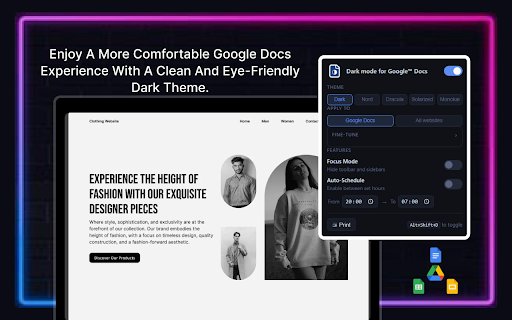
Dark mode for Google™ Docs screenshot

Links

Recommended Chrome extensions

Related listings from the same category, trending peers, and the same publisher portfolio.

Browse workflow
Auto Dark Mode — Night Shift, Schedule & Blue Light Filter icon

Auto Dark Mode — Night Shift, Schedule & Blue Light Filter

Google Doc Darkmode

Auto dark theme for every site on a schedule. Night shift, blue light filter, brightness, contrast, saturation, shortcuts.

Installs

72

Rating

★ 1.0

Адаптер Рутокен Коннект icon

Адаптер Рутокен Коннект

АО "Актив-Софт"

Защищенное TLS-соединение в браузере по ГОСТу с Рутокен

Installs

2.0M+

Rating

★ 1.6

Pop up blocker for Chrome™ - Poper Blocker icon

Pop up blocker for Chrome™ - Poper Blocker

dingosolutions

Block popups, ads, cookie requests, trackers, notifications, ads on social media & more. A clean browsing experience starts today.

Installs

2.0M+

Rating

★ 4.8

AI Grammar Checker & Paraphraser – LanguageTool icon

AI Grammar Checker & Paraphraser – LanguageTool

lt-extension-publisher

Instantly Enhance Your Texts with LanguageTool’s Grammar Checker and Paraphrasing Tool

Installs

2.0M+

Rating

★ 4.7

Momentum icon

Momentum

Momentum

Transform your browser into a beautifully designed tab that helps you feel calm, keep focus, and stay energized.

Installs

2.0M+

Rating

★ 4.5

My Apps Secure Sign-in Extension icon

My Apps Secure Sign-in Extension

Microsoft

My Apps Secure Sign-in Extension

Installs

2.0M+

Rating

★ 2.2

Web Signer icon

Web Signer

Softplan Websigner Developers

Extensão para assinatura digital no browser

Installs

2.0M+

Rating

★ 3.0

Evernote Web Clipper icon

Evernote Web Clipper

Evernote

Use the Evernote extension to save things you see on the web into your Evernote account.

Installs

2.0M+

Rating

★ 4.7

Google Scholar PDF Reader icon

Google Scholar PDF Reader

scholar-chrome-extensions

Supercharge your paper reading: follow references, skim outline, jump to figures, cite and save.

Installs

2.0M+

Rating

★ 4.1

Keeper® Password Manager & Digital Vault icon

Keeper® Password Manager & Digital Vault

Keeper Security

Generate strong passwords, autofill and protect your confidential info with zero-knowledge encryption.

Installs

2.0M+

Rating

★ 4.8