COT Reports icon

COT Reports Chrome Extension Analysis

Niche Lifestyle & Gaming Hacks

Chrome extension ID: kjehjpcjippeolmfbclhlinlnkfaceph

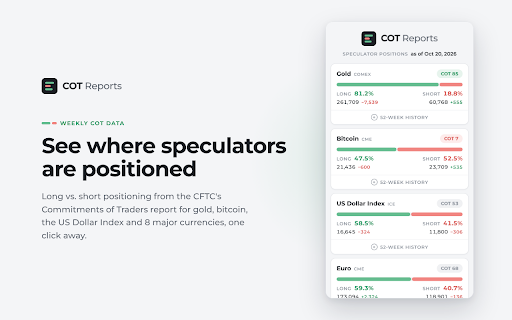
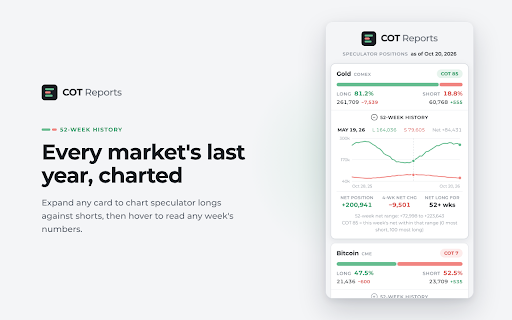
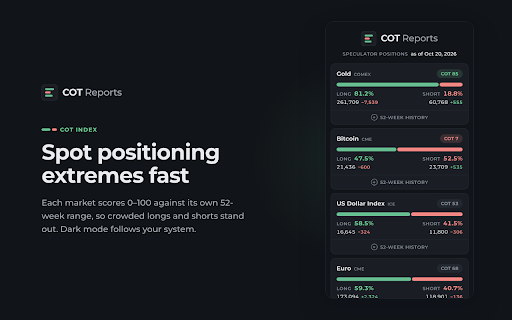
COT Reports is a browser extension that visualizes financial futures market data released by the CFTC. It provides a simplified interface for traders to view hedge fund positions and market trends without needing to parse raw government data manually.

Developer:Maxwell Pepper
Version:3.0
Size:18.03KiB
Last updated:

Overview

Installs

322

Rating

★ 5.0

7 reviews

Languages

1 locales

Includes English

Market analysis

Review-backed positioning, friction, and market signals for this Chrome extension.

Backed by review samples

Macro category

Niche Lifestyle & Gaming Hacks

Pricing friction

Low review signal

Complaint intensity

Low review signal

Listing & review signals
Observed signals from store listing text and review samples.

Listing positioning

The extension positions itself as a specialized utility for day and swing traders to monitor Commitment of Traders (COT) report data directly within their browser. It emphasizes accessibility, helping traders identify hedge fund positioning in currency markets to gain confluence for their trading decisions.

Inferred product pattern

Single-utility dashboard for financial market data visualization.

Review-backed pain points

Users expressed a desire for deeper analytical features, specifically more historical context, percentage change metrics, and inclusion of Open Interest data.

Observed feature gaps

Lack of advanced historical charting, absence of Open Interest metrics, and occasional discrepancies in specific currency pair position data.

Tags
COT ReportsFinancial TradingMarket AnalysisFutures Trading
Target users

- Day Traders

- Swing Traders

- Forex Investors

Primary use cases

- Monitoring hedge fund positions in currency markets

- Analyzing financial futures market trends

- Gaining trading confluence

Positive themes

- Clean and simple interface

- Convenient access to market data

- High utility for daily trading routine

Negative themes

- Concerns regarding data accuracy for specific currency pairs

- Requests for advanced metrics like percentage changes and Open Interest

- Desire for more historical data and a more compact UI

Observed friction

- None identified; the extension is free to use.

Evidence boundary: Data gathered from user reviews highlighting high satisfaction with utility, balanced by constructive feedback requesting more granular financial metrics. Review sample size is small, representing a niche user base; accuracy claims remain subjective to user experience.
Complaint summaries
Review-backed complaint signals grouped by operational area.

Support

None identified.

Reliability

Some users noted occasional accuracy concerns for specific currency data.

Privacy

None identified.

Access & pricing

- Ad-supported model observed

- No account requirement observed

- Free plan or free usage claimed

Store listing facts

Listing assets

- Screenshots: 3

- Videos: 1

- Languages: 1

Trust signals

- Privacy policy

- Developer contact

- Official website

Store metadata

- Version: 3.0

- Size: 18.03KiB

- Last updated:

Listing SEO keywords

Search intent keywords
Keyword signals for evaluating how users may discover, compare, or search for this extension category.

Core discovery

COT report trackerForex market sentiment toolHedge fund positions extension

Comparison

COT data browser toolbest trader tools for chrome

Problem

how to read COT reportssimplify futures market analysis

Alternative

COT data visualizationfutures trading research tools

Similar extensions

Jump to related discovery paths:

Screenshots

COT Reports screenshot

Links

Recommended Chrome extensions

Related listings from the same category, trending peers, and the same publisher portfolio.

Browse workflow
Tag Snag icon

Tag Snag

Maxwell Pepper

Snag the tags from any YouTube video, or from the top search results, and copy them in one click.

Installs

1K+

Rating

★ 4.3

Enable local file links icon

Enable local file links

Takashi Sugimoto (tksugimoto)

Make it possible to open by click a link to a local file that is disabled by Chrome.

Installs

3.0M+

Rating

★ 3.9

Microsoft Defender Browser Protection icon

Microsoft Defender Browser Protection

Microsoft Corporation

Protect yourself against online threats, like phishing and malicious websites, with real-time protection from Microsoft.

Installs

3.0M+

Rating

★ 3.1

Content Server Browser Web Extension icon

Content Server Browser Web Extension

OpenText Corporation

Content Server Browser Web Extension for Chrome

Installs

3.0M+

Rating

★ 2.8

金山收藏助手 icon

金山收藏助手

金山收藏助手

一键收藏,永久保存网页正文或片段到金山文档

Installs

2.0M+

Rating

★ 4.7

Evernote Web Clipper icon

Evernote Web Clipper

Evernote

Use the Evernote extension to save things you see on the web into your Evernote account.

Installs

2.0M+

Rating

★ 4.5

Scribe: AI Documentation, SOPs & Process Intelligence icon

Scribe: AI Documentation, SOPs & Process Intelligence

chrome-store-admins

Turn any workflow into documentation your teams and AI agents can follow. Save each team member 35 hours/month.

Installs

2.0M+

Rating

★ 4.4

Momentum icon

Momentum

Momentum

Transform your browser into a beautifully designed tab that helps you feel calm, keep focus, and stay energized.

Installs

2.0M+

Rating

★ 4.2

Google Scholar PDF Reader icon

Google Scholar PDF Reader

scholar-chrome-extensions

Supercharge your paper reading: follow references, skim outline, jump to figures, cite and save.

Installs

2.0M+

Rating

★ 4.0

Pop up blocker for Chrome™ - Poper Blocker icon

Pop up blocker for Chrome™ - Poper Blocker

dingosolutions

Block popups, ads, cookie requests, trackers, notifications, ads on social media & more. A clean browsing experience starts today.

Installs

2.0M+

Rating

★ 4.5