Sangoma CX Click to Dial icon

Sangoma CX Click to Dial Chrome Extension Analysis

Automation & Workflow Efficiency

Chrome extension ID: lokghkokfccbkhnadnlajemhfcklbaap

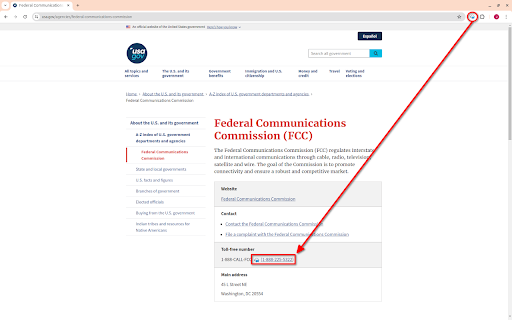
This Chrome extension serves as a click-to-dial tool, identifying phone numbers within web page content and enabling users to initiate calls directly through the Sangoma CX Agent Panel by simply clicking the detected numbers. It is intended for use by subscribers of Sangoma CX Standard, Advanced, or Premium services.

Version:2.1.0
Size:151KiB
Last updated:

Overview

Installs

131

Rating

0 reviews

Languages

1 locales

Includes English

Market analysis

Review-backed positioning, friction, and market signals for this Chrome extension.

No review samples found

Macro category

Automation & Workflow Efficiency

Pricing friction

Moderate review signal

Complaint intensity

Low review signal

Listing & review signals
Observed signals from store listing text and review samples.

Listing positioning

The store listing positions the product as a Chrome extension designed to detect phone numbers on web pages, converting them into clickable links for direct dialing via the Sangoma CX Agent Panel. It emphasizes seamless integration with the Sangoma CX service to streamline outbound calling workflows.

Inferred product pattern

A B2B integration extension that enhances a primary SaaS offering (Sangoma CX) by adding workflow automation functionality directly within the browser.

Review-backed pain points

Review-backed data is not available.

Observed feature gaps

Review-backed data is not available.

Tags
Click To DialCRM IntegrationCall AutomationContact CenterProductivity
Target users

- Sangoma CX Users

- Contact Center Agents

- Sales Teams

- Customer Support Teams

Primary use cases

- Initiating calls directly from web pages using Sangoma CX

- Automating and streamlining outbound dialing processes for agents

- Improving efficiency in contact centers and sales environments

Positive themes

No positive theme data.

Negative themes

No negative theme data.

Observed friction

- Payment required for meaningful usage

- Users must have an active subscription to Sangoma CX Standard, Advanced, or Premium service to utilize this extension, indicating that its functionality is not standalone or free.

Evidence boundary: The analysis is based on the Chrome Web Store listing, including the title, short and long descriptions, and developer information. Review-backed evidence is not available due to a lack of user reviews for this extension.
Complaint summaries
Review-backed complaint signals grouped by operational area.

Support

Review-backed data is not available.

Reliability

Review-backed data is not available.

Privacy

Review-backed data is not available.

Access & pricing

- Subscription model observed

- Account required for core usage

- Paid-only usage observed

Store listing facts

Listing assets

- Screenshots: 1

- Videos: 0

- Languages: 1

Trust signals

- Privacy policy

- Developer contact

Store metadata

- Version: 2.1.0

- Size: 151KiB

- Last updated:

Listing SEO keywords

Search intent keywords
Keyword signals for evaluating how users may discover, compare, or search for this extension category.

Core discovery

click to dial chrome extensionsangoma cx integrationphone number detection browserweb page dialing tool

Comparison

sangoma cx vs [competitor]click to dial alternativescontact center dialer comparison

Problem

manual dialing inefficiencystreamline call workflowintegrate CRM with browser dialing

Alternative

chrome dialer extensionsbrowser phone integrationcrm click to call tools

Similar extensions

Jump to related discovery paths:

Screenshots

Sangoma CX Click to Dial screenshot

Links

Recommended Chrome extensions

Related listings from the same category, trending peers, and the same publisher portfolio.

Browse workflow
Sangoma Meet icon

Sangoma Meet

sangoma-cloud-apps

This extension adds Sangoma Meet button to Google Calendar UI to simplify adding Sangoma meeting details into a calendar invite.

Installs

585

Rating

5.0

Sangoma Connector icon

Sangoma Connector

sangoma-cloud-apps

Sangoma CRM integration for BV/BV+

Installs

281

Rating

Keeper® Password Manager & Digital Vault icon

Keeper® Password Manager & Digital Vault

Keeper Security

Generate strong passwords, autofill and protect your confidential info with zero-knowledge encryption.

Installs

2.0M+

Rating

4.8

Snow Web Application Metering icon

Snow Web Application Metering

snow_chrome_extensions

This extension tracks web application use for the purpose of license compliance and cost optimization. www.snowsoftware.com/browser

Installs

2.0M+

Rating

1.3

Mendeley Web Importer icon

Mendeley Web Importer

Mendeley

Fast, convenient import of references and PDFs to your Mendeley Reference Manager library.

Installs

2.0M+

Rating

2.3

Enable local file links icon

Enable local file links

Takashi Sugimoto (tksugimoto)

Make it possible to open by click a link to a local file that is disabled by Chrome.

Installs

2.0M+

Rating

3.9

Microsoft Defender Browser Protection icon

Microsoft Defender Browser Protection

Microsoft Corporation

Protect yourself against online threats, like phishing and malicious websites, with real-time protection from Microsoft.

Installs

2.0M+

Rating

4.2

Визуальные закладки icon

Визуальные закладки

Yandex

Визуальные закладки – это страница, на которой собраны ваши любимые сайты

Installs

2.0M+

Rating

3.4

Web Signer icon

Web Signer

Softplan Websigner Developers

Extensão para assinatura digital no browser

Installs

2.0M+

Rating

2.9

Screen Recorder icon

Screen Recorder

Erich Behrens

Record a video from the camera or capture it from the screen (desktop, specific application window or browser tab)

Installs

2.0M+

Rating

3.8