Thiruttham: Tamil Spell Checker, Grammar Check & Tanglish Typing icon

Thiruttham Chrome Extension Analysis

AI & Writing Assistants

Store listing title: Thiruttham: Tamil Spell Checker, Grammar Check & Tanglish Typing

Chrome extension ID: mdhodnadkcammnbfjnlapgambgegejem

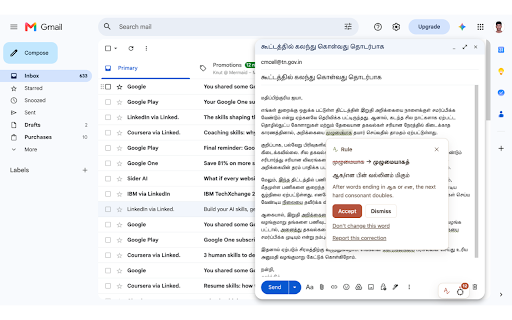
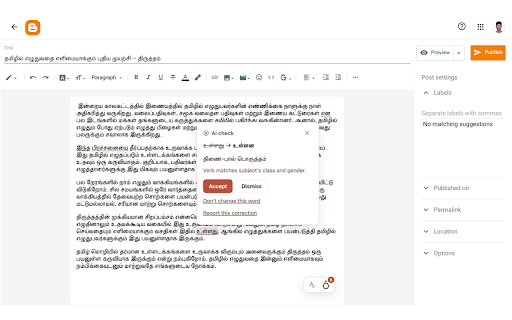
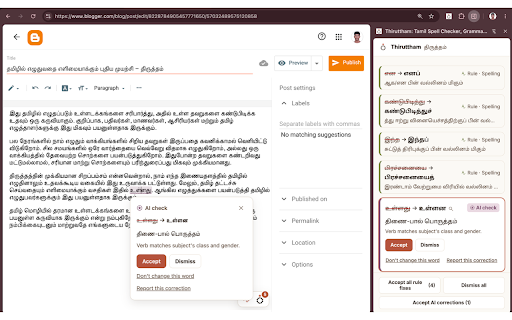
This extension provides grammar and spelling correction for formal Tamil text within web-based text fields. It includes features like Tanglish-to-Tamil script conversion and a personal dictionary, while explicitly promising not to use user text for AI model training.

Developer:Midhunan
Version:0.6.2
Size:980KiB
Last updated:

Overview

Installs

16

Rating

★ 5.0

2 reviews

Languages

1 locales

Includes English

Market analysis

Review-backed positioning, friction, and market signals for this Chrome extension.

No review samples found

Macro category

AI & Writing Assistants

Pricing friction

Low review signal

Complaint intensity

Low review signal

Listing & review signals
Observed signals from store listing text and review samples.

Listing positioning

Thiruttham positions itself as a precise, privacy-conscious writing assistant specifically for the Tamil language. It emphasizes deterministic, offline-capable grammar checking and context-aware AI corrections that require manual user confirmation before application.

Inferred product pattern

Specialized linguistic utility with a focus on local language processing and privacy.

Review-backed pain points

Review-backed data is not available.

Observed feature gaps

No feature gaps identified from public listing; no review-backed data available.

Tags
Tamil GrammarWriting AssistantTanglish ConversionLanguage Tool
Target users

- Tamil language writers

- Bloggers

- Students

- Professionals using Tamil in web forms

Primary use cases

- Grammar and spelling correction

- Converting Romanized Tamil (Tanglish) to Tamil script

- Maintaining professional standards in Tamil correspondence

Positive themes

No positive theme data.

Negative themes

No negative theme data.

Observed friction

- No pricing friction reported; product claims to be free.

Evidence boundary: Evidence is derived solely from the official Chrome Web Store listing, including the short/long descriptions and developer-provided privacy claims. The analysis is limited by the absence of user reviews, preventing any validation of the actual tool performance or user sentiment.
Complaint summaries
Review-backed complaint signals grouped by operational area.

Support

No support complaints available.

Reliability

No reliability complaints available.

Privacy

No privacy complaints available.

Access & pricing

- Free usage observed

- No account requirement observed

- Free plan or free usage claimed

Store listing facts

Listing assets

- Screenshots: 3

- Videos: 0

- Languages: 1

Trust signals

- Privacy policy

- Developer contact

- Official website

- Support link

Store metadata

- Version: 0.6.2

- Size: 980KiB

- Last updated:

Listing SEO keywords

Search intent keywords
Keyword signals for evaluating how users may discover, compare, or search for this extension category.

Core discovery

Tamil grammar checkerTamil spell check extensionTanglish to Tamil converterTamil writing tool

Comparison

Tamil language toolsTamil typing assistant

Problem

Tamil spelling errorsformal Tamil writing

Alternative

Tamil translation toolsTamil language keyboard alternatives

Similar extensions

Jump to related discovery paths:

Screenshots

Thiruttham: Tamil Spell Checker, Grammar Check & Tanglish Typing screenshot

Links

Recommended Chrome extensions

Related listings from the same category, trending peers, and the same publisher portfolio.

Browse education
AttendEase icon

AttendEase

Midhunan

Sleek attendance tracker for Amrita students—instantly shows your safe bunks.

Installs

2K+

Rating

★ 5.0

Night PDF: Smart Dark Mode for PDFs icon

Night PDF: Smart Dark Mode for PDFs

Midhunan

Read PDFs in true dark mode without lag or color distortion. Features draggable Focus Curtains to hide blinding borders.

Installs

103

Rating

★ 4.0

Knowt: Quizlet Import, AI Notes & Flashcards icon

Knowt: Quizlet Import, AI Notes & Flashcards

Knowt

Automatically import flashcards and notes from any video, PDF, article, or flashcard site. Knowt is the fastest way to study.

Installs

200K+

Rating

★ 4.9

Mouse Tooltip Translator - PDF & Netflix YouTube dual subs icon

Mouse Tooltip Translator - PDF & Netflix YouTube dual subs

ttop324

Mouse Tooltip Translator translate mouseover text using google translate. Support OCR, TTS, manga translator & pdf translator.

Installs

200K+

Rating

★ 4.7

Paperpile Extension icon

Paperpile Extension

Paperpile

Collect, organize, annotate and cite your research papers in Chrome.

Installs

200K+

Rating

★ 4.1

Talk & Comment: Voice Feedback & Audio Comments for Teachers icon

Talk & Comment: Voice Feedback & Audio Comments for Teachers

TalkandComment.com

Leave voice feedback on student work in Google Docs, Classroom or any page. Share one link; students listen on their phone.

Installs

200K+

Rating

★ 4.0

Study Tools voor Magister icon

Study Tools voor Magister

QkeleQ10

Een extensie die verschillende aspecten van Magister verbetert en problemen ermee oplost.

Installs

200K+

Rating

★ 4.5

rikaikun icon

rikaikun

Erek Speed

rikaikun shows the reading and English definition of Japanese words when you hover over Japanese text in the browser.

Installs

200K+

Rating

★ 4.6

Reverso – Translation, dictionary icon

Reverso – Translation, dictionary

Reverso Technologies Inc.

Translate and learn languages while reading or watching movies online. It's free.

Installs

200K+

Rating

★ 4.0

Padlet Mini icon

Padlet Mini

engine

Collect and bookmark the best of the web for yourself or with friends.

Installs

200K+

Rating

★ 4.1