LinkedIn Reminders – Follow Up & Reply Later icon

LinkedIn Reminders Chrome Extension Analysis

Automation & Workflow Efficiency

Store listing title: LinkedIn Reminders – Follow Up & Reply Later

Chrome extension ID: mfhgmabnebphhalgdpnchmhocigdnofk

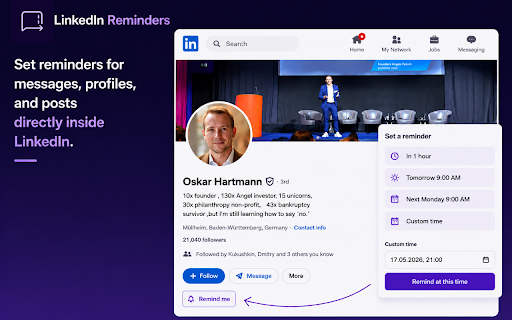
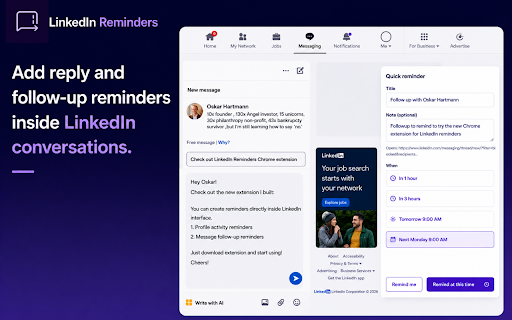
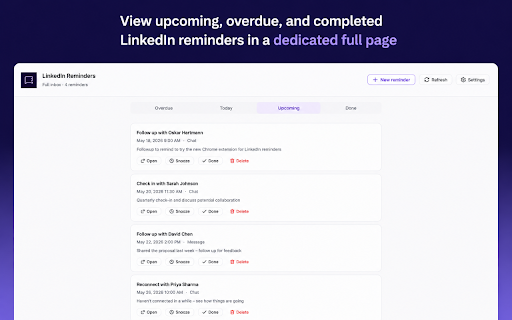
A browser extension that allows users to set reminders for LinkedIn messages, profiles, and posts. It features a local inbox for managing tasks and supports manual follow-up sequences using templates.

Developer:Peipus agency
Version:2.3.0
Size:373KiB
Last updated:

Overview

Installs

12

Rating

5.0

1 reviews

Languages

18 locales

Includes Deutsch, English, Indonesia, Nederlands...

Market analysis

Review-backed positioning, friction, and market signals for this Chrome extension.

No review samples found

Macro category

Automation & Workflow Efficiency

Pricing friction

Low review signal

Complaint intensity

Low review signal

Listing & review signals
Observed signals from store listing text and review samples.

Listing positioning

The product is positioned as a lightweight, non-automation system for managing LinkedIn follow-ups. It emphasizes a 'manual' approach to avoid automation risks while providing CRM-like organization directly within the LinkedIn interface.

Inferred product pattern

Local-first productivity overlay that adds a task management layer to a third-party social platform without requiring server-side accounts.

Review-backed pain points

Review-backed data is not available.

Observed feature gaps

Lack of cross-device synchronization as data is stored locally (acknowledged in roadmap).

Tags
LinkedIn ProductivityFollow Up ToolCRM AlternativeSales WorkflowRecruitment Tool
Target users

- Recruiters

- Sales Professionals

- Founders

- Investors

- Job Seekers

- Active Networkers

Primary use cases

- Setting reminders to reply to messages

- Tracking manual outreach sequences

- Scheduling follow-ups for LinkedIn profiles

- Reminding to engage with specific posts

Positive themes

No positive theme data.

Negative themes

No negative theme data.

Observed friction

- No pricing information provided in the listing.

Evidence boundary: Data extracted from the store listing, including the detailed feature list, FAQ, and roadmap. No user reviews available to validate performance or user satisfaction.
Complaint summaries
Review-backed complaint signals grouped by operational area.

Support

Review-backed data is not available.

Reliability

Review-backed data is not available.

Privacy

Review-backed data is not available.

Access & pricing

- No clear monetization signal

- No account requirement observed

- Free plan or free usage claimed

Store listing facts

Listing assets

- Screenshots: 3

- Videos: 0

- Languages: 18

Trust signals

- Privacy policy

- Developer contact

- Official website

Store metadata

- Version: 2.3.0

- Size: 373KiB

- Last updated:

Listing SEO keywords

Search intent keywords
Keyword signals for evaluating how users may discover, compare, or search for this extension category.

Core discovery

LinkedIn reminder extensionLinkedIn follow up toolLinkedIn message remindersmanual LinkedIn sequences

Comparison

LinkedIn CRM alternativeLinkedIn automation vs manual follow up

Problem

forgetting to reply to LinkedIn messagesLinkedIn messages getting buriedmanaging LinkedIn leads without CRM

Alternative

LinkedIn reminder tool alternativeLinkedIn follow up tracker

Similar extensions

Jump to related discovery paths:

Screenshots

LinkedIn Reminders – Follow Up & Reply Later screenshot

Links

Recommended Chrome extensions

Related listings from the same category, trending peers, and the same publisher portfolio.

Browse workflow
CSV to Google Sheets – Open CSV Instantly icon

CSV to Google Sheets – Open CSV Instantly

Peipus agency

Open CSV files in Google Sheets in 1–2 clicks. Skip manual upload and import steps and start working instantly.

Installs

918

Rating

5.0

Mouse Highlight & Annotation Tool icon

Mouse Highlight & Annotation Tool

Peipus agency

Highlight your cursor and draw temporary annotations on any webpage. Perfect for presentations, demos, and screen sharing.

Installs

170

Rating

5.0

AI Grammar Checker & Paraphraser – LanguageTool icon

AI Grammar Checker & Paraphraser – LanguageTool

lt-extension-publisher

Instantly Enhance Your Texts with LanguageTool’s Grammar Checker and Paraphrasing Tool

Installs

2.0M+

Rating

4.7

Sound Booster - increase volume up icon

Sound Booster - increase volume up

Sound-ultimate.com

Volume Booster helps boost sound video or music on any tab! Increase volume and bass booster, equalizer. Volume control.

Installs

2.0M+

Rating

4.5

Momentum icon

Momentum

Momentum

Transform your browser into a beautifully designed tab that helps you feel calm, keep focus, and stay energized.

Installs

2.0M+

Rating

4.5

Evernote Web Clipper icon

Evernote Web Clipper

Evernote

Use the Evernote extension to save things you see on the web into your Evernote account.

Installs

2.0M+

Rating

4.7

Keeper® Password Manager & Digital Vault icon

Keeper® Password Manager & Digital Vault

Keeper Security

Generate strong passwords, autofill and protect your confidential info with zero-knowledge encryption.

Installs

2.0M+

Rating

4.8

Snow Web Application Metering icon

Snow Web Application Metering

snow_chrome_extensions

This extension tracks web application use for the purpose of license compliance and cost optimization. www.snowsoftware.com/browser

Installs

2.0M+

Rating

1.3

Mendeley Web Importer icon

Mendeley Web Importer

Mendeley

Fast, convenient import of references and PDFs to your Mendeley Reference Manager library.

Installs

2.0M+

Rating

2.3

Enable local file links icon

Enable local file links

Takashi Sugimoto (tksugimoto)

Make it possible to open by click a link to a local file that is disabled by Chrome.

Installs

2.0M+

Rating

3.9