LinkedIn Feed Blocker Extension icon

LinkedIn Feed Blocker Extension Chrome Extension Analysis

Automation & Workflow Efficiency

Chrome extension ID: ndihnjghgamcibkommlhbfcimaajgjdp

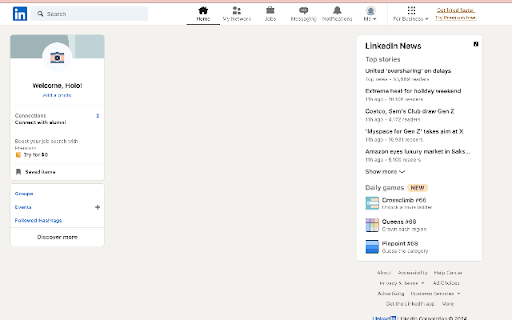
This is a browser extension that modifies the LinkedIn interface to hide the main feed. Its primary function is to prevent mindless scrolling by removing content from the user's dashboard.

Version:1.0
Size:190KiB
Last updated:

Overview

Installs

605

Rating

2.1

11 reviews

Languages

1 locales

Includes English (United States)

Market analysis

Review-backed positioning, friction, and market signals for this Chrome extension.

Backed by review samples

Macro category

Automation & Workflow Efficiency

Pricing friction

Low review signal

Complaint intensity

Moderate review signal

Listing & review signals
Observed signals from store listing text and review samples.

Listing positioning

The extension is positioned as a productivity utility designed to help users minimize distractions by blocking the LinkedIn feed. It offers a simple, single-purpose solution for maintaining focus while using the LinkedIn platform.

Inferred product pattern

Single-purpose CSS/DOM injection tool for content blocking.

Review-backed pain points

The primary pain point is that the extension currently does not function as intended for a majority of recent reviewers, suggesting breakage following LinkedIn UI updates.

Observed feature gaps

Lack of updates to maintain compatibility with changes to the LinkedIn website layout.

Tags
ProductivityLinkedInFeed BlockerFocus Tool
Target users

- LinkedIn users

- Productivity-focused professionals

- Knowledge workers

Primary use cases

- Blocking LinkedIn feed

- Reducing digital distraction

Positive themes

- Effective at removing distractions

- Simple functionality

Negative themes

- Extension is non-functional

- Failure to block content

Observed friction

- Performance complaints detected

- No pricing friction reported; the extension is perceived as free, but utility is currently limited by technical failure.

Evidence boundary: Evidence is derived from 11 user reviews highlighting a mix of historical satisfaction and recent reports of functional failure. The sample size is small, and the high frequency of 'does not work' reviews indicates the product may currently be outdated regarding LinkedIn's site architecture.
Complaint summaries
Review-backed complaint signals grouped by operational area.

Support

Users expressed frustration regarding the extension being non-functional, though no specific support interactions were detailed.

Reliability

Significant reliability complaints; the consensus among recent reviewers is that the extension has stopped working entirely.

Privacy

No privacy-related complaints observed.

Access & pricing

- Free usage observed

- No account requirement observed

- Free plan or free usage claimed

Store listing facts

Listing assets

- Screenshots: 1

- Videos: 0

- Languages: 1

Trust signals

- Privacy policy

- Developer contact

Store metadata

- Version: 1.0

- Size: 190KiB

- Last updated:

Listing SEO keywords

Search intent keywords
Keyword signals for evaluating how users may discover, compare, or search for this extension category.

Core discovery

LinkedIn feed blockerblock LinkedIn feed extensionhow to hide LinkedIn feed

Comparison

LinkedIn distraction blockerproductivity extensions

Problem

stop LinkedIn scrollingremove LinkedIn feed

Alternative

content blocker for LinkedIn

Similar extensions

Jump to related discovery paths:

Screenshots

LinkedIn Feed Blocker Extension screenshot

Links

Recommended Chrome extensions

Related listings from the same category, trending peers, and the same publisher portfolio.

Browse education
Focus to LeetCode icon

Focus to LeetCode

Sanskriti Lamsal

Reroutes distracting sites (Instagram, TikTok, X, LinkedIn) to leetcode.com so you go grind instead.

Installs

4

Rating

GPTZero: AI Detection & Writing Replay icon

GPTZero: AI Detection & Writing Replay

chrome-extension-publisher

Bring AI detection, citation checks, live essay feedback, and writing replays directly into Google Docs and your workflow.

Installs

400K+

Rating

4.7

Cite This For Me: Web Citer icon

Cite This For Me: Web Citer

Chegg Writing Tools

Automatically create website citations in the APA, MLA, Chicago, or Harvard referencing styles at the click of a button.

Installs

400K+

Rating

3.8

Trancy - AI Translator & Dual Subtitles icon

Trancy - AI Translator & Dual Subtitles

Trancy

Trancy provides bilingual subtitle for platforms like YouTube, Disney+, as well as AI translator for websites.

Installs

300K+

Rating

4.7

Google Meet Attendance List icon

Google Meet Attendance List

MeetList

Easiest way to save the attendance list for your meetings or lectures

Installs

300K+

Rating

4.7

edpuzzle icon

edpuzzle

Edpuzzle

Import your favorite educational YouTube video into Edpuzzle with a click!

Installs

300K+

Rating

4.2

Revision History: Writing Process Visibility for Google Docs & Slides icon

Revision History: Writing Process Visibility for Google Docs & Slides

Revision History

Built for teachers: See how students write, not just what they wrote. View the writing process in Google Docs & Slides.

Installs

200K+

Rating

3.7

rikaikun icon

rikaikun

Erek Speed

rikaikun shows the reading and English definition of Japanese words when you hover over Japanese text in the browser.

Installs

200K+

Rating

4.7

Mouse Tooltip Translator - PDF & Netflix YouTube dual subs icon

Mouse Tooltip Translator - PDF & Netflix YouTube dual subs

ttop324

Mouse Tooltip Translator translate mouseover text using google translate. Support OCR, TTS, manga translator & pdf translator.

Installs

200K+

Rating

4.6

Paperpile Extension icon

Paperpile Extension

Paperpile

Collect, organize, annotate and cite your research papers in Chrome.

Installs

200K+

Rating

4.6