ActivityWatch Web Watcher icon

ActivityWatch Web Watcher Chrome Extension Analysis

Automation & Workflow Efficiency

Chrome extension ID: nglaklhklhcoonedhgnpgddginnjdadi

An open-source browser extension designed to monitor and log time spent on various websites. It tracks browser active states and sends data directly to a locally-run ActivityWatch server, keeping user data private and self-hosted. It works in the background to help users audit their online productivity without sending data to third-party servers.

Version:0.6.0
Size:108KiB
Last updated:

Overview

Installs

50K+

Rating

★ 5.0

67 reviews

Languages

1 locales

Includes English

Market analysis

Review-backed positioning, friction, and market signals for this Chrome extension.

Backed by review samples

Macro category

Automation & Workflow Efficiency

Pricing friction

Low review signal

Complaint intensity

Low review signal

Listing & review signals
Observed signals from store listing text and review samples.

Listing positioning

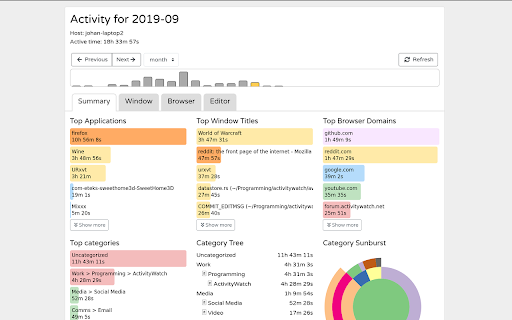
The store listing positions ActivityWatch Web Watcher as a secure browser companion extension for the ActivityWatch desktop program. It emphasizes automated, detailed time-tracking of web activities and active tabs while maintaining data privacy. It also highlights that the codebase is completely open-source and accessible on GitHub.

Inferred product pattern

A local-host client integration that monitors active browser tabs and communicates with a locally running desktop database via API.

Review-backed pain points

The most notable user pain point is the lack of immediate feedback in the extension UI indicating whether it is successfully talking to the local desktop server. Additionally, ChromeOS users find it difficult to connect the extension directly to the Android container without setting up a Linux environment.

Observed feature gaps

There is an observed gap in server-connectivity indicators directly inside the extension popup UI. Users also requested smoother integration paths between ChromeOS browsers and mobile apps, along with better internal promotion of the extension inside the desktop app setup guides.

Tags
Time TrackerProductivity TrackerOpen SourcePrivacy FirstActivity Log
Target users

- Privacy-focused self-trackers

- Developers and tech-savvy professionals

- Quantified Self enthusiasts

- Remote workers auditing active work hours

Primary use cases

- Monitoring web browser activity and active tab duration

- Self-tracking to identify personal time-wasting habits

- Aggregating browsing data into local productivity dashboards

Positive themes

- Completely free and open-source model

- Outstanding local privacy with zero data leakage to external companies

- Low impact on system resources and background performance

- Accurate, real-time logging of web domains

Negative themes

- Lack of connection status clarity when the local desktop server is stopped

- Poor initial extension discoverability from the main desktop application settings

- Lack of direct native support for syncing with Android/ChromeOS apps

Observed friction

- No pricing friction was observed. Users frequently express appreciation that the tool is entirely free, self-hosted, and open-source.

Evidence boundary: Feedback points are gathered directly from the extension description, its GitHub repository pointers, and 10 highly positive user reviews (averaging ~4.97 rating). Key themes extracted include the local privacy benefit, light system resource usage, and requests for clear local server connection indicators. The findings are based on a sample of 10 high-value reviews from an overall pool of 63 reviews, meaning niche edge cases or complex developer environment issues may not be fully represented.
Complaint summaries
Review-backed complaint signals grouped by operational area.

Support

No traditional support or customer service complaints were found, though users occasionally use reviews to post technical feature requests or ask for store compliance updates.

Reliability

The extension is highly reliable and does not slow down Chrome. The only minor reliability frustration relates to connection state transparency if the mandatory local desktop server is stopped.

Privacy

Privacy reviews are exceptionally positive. Users praise the local-first architecture which ensures personal browsing telemetry is not transmitted to external cloud servers.

Access & pricing

- Free usage observed

- No account requirement observed

- Free plan or free usage claimed

Store listing facts

Listing assets

- Screenshots: 1

- Videos: 0

- Languages: 1

Trust signals

- Developer contact

- Official website

- Support link

Store metadata

- Version: 0.6.0

- Size: 108KiB

- Last updated:

Listing SEO keywords

Search intent keywords
Keyword signals for evaluating how users may discover, compare, or search for this extension category.

Core discovery

ActivityWatch browser extensionlocal web time trackeropen source browser watcherself hosted time tracker

Comparison

ActivityWatch vs RescueTimeActivityWatch vs Toggllocal vs cloud time tracking

Problem

track browser time privatelyopen source web logwhere do I waste time online

Alternative

RescueTime alternativeToggl alternativeManicTime alternative

Similar extensions

Jump to related discovery paths:

Screenshots

ActivityWatch Web Watcher screenshot

Links

Recommended Chrome extensions

Related listings from the same category, trending peers, and the same publisher portfolio.

Browse workflow
My Apps Secure Sign-in Extension icon

My Apps Secure Sign-in Extension

Microsoft

My Apps Secure Sign-in Extension

Installs

2.0M+

Rating

★ 2.2

Web Signer icon

Web Signer

Softplan Websigner Developers

Extensão para assinatura digital no browser

Installs

2.0M+

Rating

★ 3.0

Evernote Web Clipper icon

Evernote Web Clipper

Evernote

Use the Evernote extension to save things you see on the web into your Evernote account.

Installs

2.0M+

Rating

★ 4.7

Google Scholar PDF Reader icon

Google Scholar PDF Reader

scholar-chrome-extensions

Supercharge your paper reading: follow references, skim outline, jump to figures, cite and save.

Installs

2.0M+

Rating

★ 4.1

Keeper® Password Manager & Digital Vault icon

Keeper® Password Manager & Digital Vault

Keeper Security

Generate strong passwords, autofill and protect your confidential info with zero-knowledge encryption.

Installs

2.0M+

Rating

★ 4.8

Snow Web Application Metering icon

Snow Web Application Metering

snow_chrome_extensions

This extension tracks web application use for the purpose of license compliance and cost optimization. www.snowsoftware.com/browser

Installs

2.0M+

Rating

★ 1.3

Microsoft Defender Browser Protection icon

Microsoft Defender Browser Protection

Microsoft Corporation

Protect yourself against online threats, like phishing and malicious websites, with real-time protection from Microsoft.

Installs

2.0M+

Rating

★ 4.1

Визуальные закладки icon

Визуальные закладки

Yandex

Визуальные закладки – это страница, на которой собраны ваши любимые сайты

Installs

2.0M+

Rating

★ 3.4

Screen Recorder icon

Screen Recorder

Erich Behrens

Record a video from the camera or capture it from the screen (desktop, specific application window or browser tab)

Installs

2.0M+

Rating

★ 3.8

Адаптер Рутокен Плагин icon

Адаптер Рутокен Плагин

АО "Актив-Софт"

Позволяет использовать Рутокен Плагин

Installs

2.0M+

Rating

★ 2.5