Video Quality Enhancer - 4K Upscale & Sharpen icon

Video Quality Enhancer Chrome Extension Analysis

Video & Image Downloaders

Store listing title: Video Quality Enhancer - 4K Upscale & Sharpen

Chrome extension ID: odkknaoaaofcbabfllieffifohhpfibi

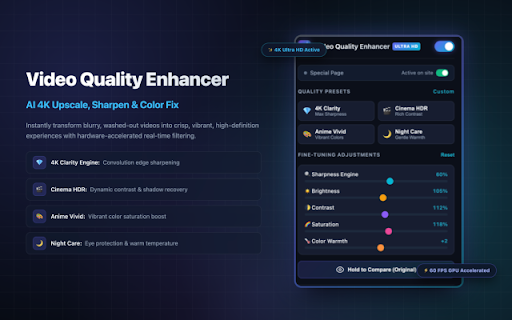
Video Quality Enhancer is a browser extension that allows users to adjust video settings like sharpness, contrast, brightness, and saturation directly on sites like YouTube and Netflix. It includes pre-configured presets for different content types and utilizes browser-based processing to enhance image quality without external server dependency.

Developer:Extensions
Version:1.0.0
Size:32.93KiB
Last updated:

Overview

Installs

30

Rating

★ —

0 reviews

Languages

1 locales

Includes English (United States)

Market analysis

Review-backed positioning, friction, and market signals for this Chrome extension.

No review samples found

Macro category

Video & Image Downloaders

Pricing friction

Low review signal

Complaint intensity

Low review signal

Listing & review signals
Observed signals from store listing text and review samples.

Listing positioning

The product positions itself as a browser-based video enhancement tool that uses real-time hardware-accelerated filters to improve clarity, sharpness, and color grading on major streaming platforms. It emphasizes privacy, zero data collection, and granular manual controls to upscale the visual experience of low-bitrate streams.

Inferred product pattern

Client-side video rendering and filter application for browser-based media.

Review-backed pain points

Review-backed data is not available.

Observed feature gaps

Review-backed data is not available.

Tags
Video EnhancementColor CorrectionBrowser UtilityStreaming Quality
Target users

- Streaming viewers

- Casual content consumers

- Night-time viewers

Primary use cases

- Improving video resolution perception

- Adjusting display brightness for eye care

- Enhancing color saturation and contrast in streaming media

Positive themes

No positive theme data.

Negative themes

No negative theme data.

Observed friction

- Review-backed data is not available.

Evidence boundary: The data is derived solely from the provided Chrome Web Store listing details as no user reviews were available for analysis. The lack of user reviews prevents verification of real-world performance, compatibility with specific browsers, or potential technical bugs.
Complaint summaries
Review-backed complaint signals grouped by operational area.

Support

Review-backed data is not available.

Reliability

Review-backed data is not available.

Privacy

Review-backed data is not available.

Access & pricing

- No clear monetization signal

- No account requirement observed

- No clear pricing signal

Store listing facts

Listing assets

- Screenshots: 1

- Videos: 0

- Languages: 1

Trust signals

- Privacy policy

- Developer contact

Store metadata

- Version: 1.0.0

- Size: 32.93KiB

- Last updated:

Listing SEO keywords

Search intent keywords
Keyword signals for evaluating how users may discover, compare, or search for this extension category.

Core discovery

improve video qualityYouTube sharpen filterbrowser video enhancerNetflix image settings

Comparison

Video Quality Enhancer vs display settingsbrowser filter extensions

Problem

blurry video fixstreaming quality issueseye strain from monitor

Alternative

video enhancement softwarebrowser color correction tools

Similar extensions

Jump to related discovery paths:

Screenshots

Video Quality Enhancer - 4K Upscale & Sharpen screenshot

Links

Recommended Chrome extensions

Related listings from the same category, trending peers, and the same publisher portfolio.

Browse tools
Roblox Server Finder - RSF icon

Roblox Server Finder - RSF

Extensions

Find the best servers for your Roblox experience. Filter by player count and join instantly.

Installs

716

Rating

★ 3.0

Disable HTML5 Autoplay icon

Disable HTML5 Autoplay

Extensions

Disables HTML5 autoplay of videos and audios. Block unwanted playback, mute autoplay, and whitelist favorite sites.

Installs

143

Rating

★ —

Google Input Tools icon

Google Input Tools

cloud-input-team

Input Tools lets you type in the language of your choice.

Installs

4.0M+

Rating

★ 3.7

IE Tab icon

IE Tab

Blackfish Software

Display web pages using IE within Chrome. Use Java, Silverlight, ActiveX, Sharepoint, and more.

Installs

4.0M+

Rating

★ 4.0

Ad Blocker: Stands AdBlocker icon

Ad Blocker: Stands AdBlocker

Stands

Stands AdBlocker – it's a free ad blocker for YouTube, Twitch, Pop-Ups, Video Ads, and websites. Block ads everywhere with Stands!

Installs

4.0M+

Rating

★ 4.8

Google Dictionary (by Google) icon

Google Dictionary (by Google)

dictionary-extension-dev

View definitions easily as you browse the web.

Installs

4.0M+

Rating

★ 3.8

Microsoft Bing Search with Rewards icon

Microsoft Bing Search with Rewards

Microsoft Corporation

Use the Microsoft Rewards extension to find new ways to earn every day, easily track your points and set your default search to Bing

Installs

4.0M+

Rating

★ 4.4

Google Scholar Button icon

Google Scholar Button

scholar-chrome-extensions

Lookup scholarly articles as you browse the web.

Installs

4.0M+

Rating

★ 4.5

Immersive Translate: AI Web, PDF & Video Translator icon

Immersive Translate: AI Web, PDF & Video Translator

Immersive Translate

Free Translate Website, Translate PDF & Epub eBook, Translate Video Subtitles in Bilingual

Installs

3.0M+

Rating

★ 4.6

BetterTTV icon

BetterTTV

NightDev, LLC

BetterTTV enhances Twitch and YouTube with new features, emotes, and more.

Installs

3.0M+

Rating

★ 4.0