Fort-Dactylo icon

Fort-Dactylo Chrome Extension Analysis

Niche Lifestyle & Gaming Hacks

Chrome extension ID: oinhanoahimkidoamapklocopnohfepc

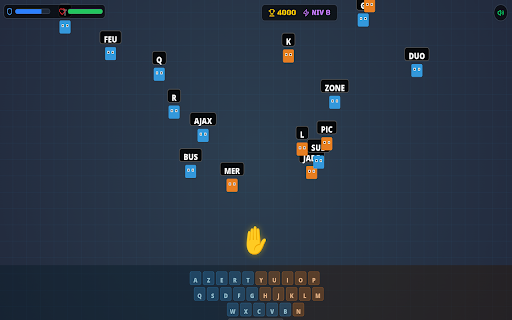
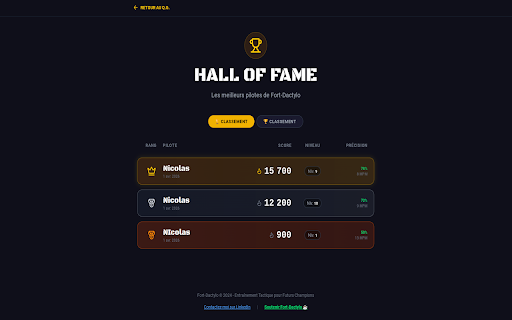
This extension functions as a browser-based typing tutor that replaces traditional drills with video game mechanics like boss battles and level progression. It tracks user performance via WPM and accuracy metrics while offering specific accessibility modes such as audio dictation and high-contrast fonts.

Developer:mygsm.fr
Version:3.0.14
Size:238KiB
Last updated:

Overview

Installs

1K+

Rating

★ 4.8

18 reviews

Languages

1 locales

Includes français

Market analysis

Review-backed positioning, friction, and market signals for this Chrome extension.

Backed by review samples

Macro category

Niche Lifestyle & Gaming Hacks

Pricing friction

Low review signal

Complaint intensity

Low review signal

Listing & review signals
Observed signals from store listing text and review samples.

Listing positioning

Fort-Dactylo is positioned as an engaging, shoot-em-up style game designed to teach typing skills through gamified mechanics. It highlights accessibility features for children with dyslexia and emphasizes a privacy-first approach with no account requirements or ads.

Inferred product pattern

Gamified educational tool focused on skill acquisition without data harvesting.

Review-backed pain points

Reviewers have requested better visual integration for the browser toolbar icon and notification badges.

Observed feature gaps

Some users desire more distinct branding in the browser toolbar rather than the default extension puzzle piece icon.

Tags
Typing TutorEducationGameDyslexia FriendlyKeyboard Skills
Target users

- Students

- Children with Dyslexia

- Keyboard Beginners

Primary use cases

- Learning touch typing

- Improving keyboard speed and accuracy

- Accessible educational gaming

Positive themes

- Educational value

- Fun gamified learning

- User-friendly interface

- Effective for skill building

Negative themes

- UI icon visibility concerns

Observed friction

- None. The product is explicitly free, requires no account, and contains no advertisements.

Evidence boundary: The evidence is based on store listing claims and user reviews. Reviews focus on the gamified learning experience, with some historical feedback regarding UI customization. The current review set contains some older feedback from 2014 which appears to reference a different iteration or product utility, likely due to a merge or migration of the extension listing.
Complaint summaries
Review-backed complaint signals grouped by operational area.

Support

No support complaints found.

Reliability

No reliability complaints found.

Privacy

No privacy complaints found; the product emphasizes local-only data storage.

Access & pricing

- Free usage observed

- No account requirement observed

- Free plan or free usage claimed

Store listing facts

Listing assets

- Screenshots: 2

- Videos: 1

- Languages: 1

Trust signals

- Developer contact

- Official website

Store metadata

- Version: 3.0.14

- Size: 238KiB

- Last updated:

Listing SEO keywords

Search intent keywords
Keyword signals for evaluating how users may discover, compare, or search for this extension category.

Core discovery

typing tutor gamelearn to typedyslexia typing gamekeyboard training extensiontouch typing practice

Comparison

vs TypeRacervs 10FastFingers

Problem

how to improve typing speedtyping games for kids

Alternative

best typing extension for chromeaccessible typing tool

Similar extensions

Jump to related discovery paths:

Screenshots

Fort-Dactylo screenshot

Links

Website: fort-dactylo.com

Videos: Watch

Recommended Chrome extensions

Related listings from the same category, trending peers, and the same publisher portfolio.

Browse education
Mychromebook.fr icon

Mychromebook.fr

mygsm.fr

Restez connecté à l'actu Chromebook avec les derniers articles, un bloc-notes, un organisateur d'onglets et des outils pratiques.

Installs

484

Rating

★ 4.6

Paperpile Extension icon

Paperpile Extension

Paperpile

Collect, organize, annotate and cite your research papers in Chrome.

Installs

200K+

Rating

★ 4.1

Talk & Comment: Voice Feedback & Audio Comments for Teachers icon

Talk & Comment: Voice Feedback & Audio Comments for Teachers

TalkandComment.com

Leave voice feedback on student work in Google Docs, Classroom or any page. Share one link; students listen on their phone.

Installs

200K+

Rating

★ 4.0

Study Tools voor Magister icon

Study Tools voor Magister

QkeleQ10

Een extensie die verschillende aspecten van Magister verbetert en problemen ermee oplost.

Installs

200K+

Rating

★ 4.5

rikaikun icon

rikaikun

Erek Speed

rikaikun shows the reading and English definition of Japanese words when you hover over Japanese text in the browser.

Installs

200K+

Rating

★ 4.6

Reverso – Translation, dictionary icon

Reverso – Translation, dictionary

Reverso Technologies Inc.

Translate and learn languages while reading or watching movies online. It's free.

Installs

200K+

Rating

★ 4.0

Padlet Mini icon

Padlet Mini

engine

Collect and bookmark the best of the web for yourself or with friends.

Installs

200K+

Rating

★ 4.1

ExCITATION – Journal Ranking & Impact Factor for Google Scholar™ icon

ExCITATION – Journal Ranking & Impact Factor for Google Scholar™

Excitation Journal

Show SJR, ABS & ABDC journal rankings in Google Scholar. Sort by citations, detect predatory journals & preview abstracts — free.

Installs

200K+

Rating

★ 4.5

Rapid Journal Quality Check icon

Rapid Journal Quality Check

jrk.devgit

Displays rankings and h-index for academic journals next to Google Scholar search results.

Installs

200K+

Rating

★ 4.3

Toucan by Babbel - Language Learning icon

Toucan by Babbel - Language Learning

jointoucan.com

Learn a new language just by browsing the internet.

Installs

200K+

Rating

★ 3.5