Photo Editor icon

Photo Editor Chrome Extension Analysis

Video & Image Downloaders

Chrome extension ID: padffmpicdplkgpeaapimbeggnmfelin

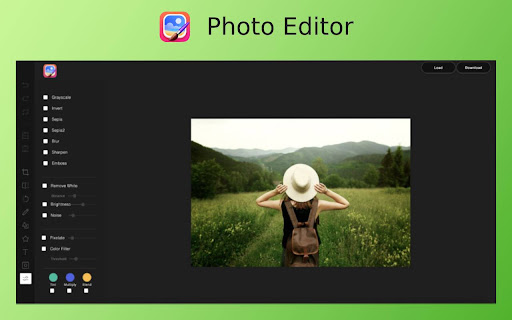
Photo Editor is a browser extension that allows users to capture and modify images found on websites via a right-click context menu. It includes basic features such as cropping, adding text, applying filters, and utilizing custom icons for quick image adjustments.

Developer:Rahul Baruri
Version:1.0.1
Size:632KiB
Last updated:

Overview

Installs

8K+

Rating

4.2

22 reviews

Languages

1 locales

Includes English (United States)

Market analysis

Review-backed positioning, friction, and market signals for this Chrome extension.

Backed by review samples

Macro category

Video & Image Downloaders

Pricing friction

Low review signal

Complaint intensity

Moderate review signal

Listing & review signals
Observed signals from store listing text and review samples.

Listing positioning

The store listing positions Photo Editor as a convenient, one-click solution for instant image modification directly within the browser. It emphasizes a user-friendly interface that removes the need for complex desktop software or third-party web-based editors.

Inferred product pattern

A simple browser-based utility that acts as a wrapper for basic web-based image manipulation libraries.

Review-backed pain points

Users report critical failures in the saving process, with some stating that only blank or black images are produced; others report an inability to apply effects to their chosen content.

Observed feature gaps

Lack of advanced professional tools like chroma keying; reports of buggy file handling and output issues.

Tags
Photo EditorImage EditingBrowser ExtensionImage EffectsQuick Edit
Target users

- Casual browser users

- Social media enthusiasts

- Users needing urgent light image edits

Primary use cases

- Quickly cropping images from websites

- Applying basic filters to web images

- Adding text annotations to captured web graphics

Positive themes

- Ease of use for quick edits

- Convenience of one-click access

- Helpful for urgent, lightweight editing tasks

Negative themes

- Inability to save images correctly

- Functional failures regarding effect application

- Inconsistent interaction with user-selected images

Observed friction

- Performance complaints detected

- No pricing friction observed as the extension is presented as free, though users report functional dissatisfaction.

Evidence boundary: Analysis is based on 10 user reviews ranging from 1-star to 5-star ratings, capturing both functional praise and reports of file-saving errors. The review sample size is small (22 total reviews) and may not represent the experience of the entire user base of 9,000+.
Complaint summaries
Review-backed complaint signals grouped by operational area.

Support

No formal support complaints reported, but technical bugs related to file saving remain unaddressed.

Reliability

Multiple reports of the extension failing to save images properly or producing blank output files.

Privacy

No privacy or security-related complaints identified in current review samples.

Access & pricing

- Free usage observed

- No account requirement observed

- Free plan or free usage claimed

Store listing facts

Listing assets

- Screenshots: 2

- Videos: 1

- Languages: 1

Trust signals

- Privacy policy

- Developer contact

- Official website

- Support link

Store metadata

- Version: 1.0.1

- Size: 632KiB

- Last updated:

Listing SEO keywords

Search intent keywords
Keyword signals for evaluating how users may discover, compare, or search for this extension category.

Core discovery

Chrome photo editoredit images in browseronline photo editor extensionright click image editor

Comparison

Photo Editor vs Photoshopbest browser image editor

Problem

Photo Editor extension not savingcannot edit photos in chrome

Alternative

CanvaPixlrFotor

Similar extensions

Jump to related discovery paths:

Screenshots

Photo Editor screenshot

Links

Recommended Chrome extensions

Related listings from the same category, trending peers, and the same publisher portfolio.

Browse workflow
JSON Viewer Pro icon

JSON Viewer Pro

Rahul Baruri

A completely free extension to visualise JSON response in awesome Tree and Chart view with great user experience and options. It…

Installs

300K+

Rating

4.6

Full Page Screenshot icon

Full Page Screenshot

Rahul Baruri

An powerful tool to capture entire webpage or selected area and annotate inside editor

Installs

10K+

Rating

3.8

Enable local file links icon

Enable local file links

Takashi Sugimoto (tksugimoto)

Make it possible to open by click a link to a local file that is disabled by Chrome.

Installs

2.0M+

Rating

3.9

Microsoft Defender Browser Protection icon

Microsoft Defender Browser Protection

Microsoft Corporation

Protect yourself against online threats, like phishing and malicious websites, with real-time protection from Microsoft.

Installs

2.0M+

Rating

4.2

Визуальные закладки icon

Визуальные закладки

Yandex

Визуальные закладки – это страница, на которой собраны ваши любимые сайты

Installs

2.0M+

Rating

3.4

Web Signer icon

Web Signer

Softplan Websigner Developers

Extensão para assinatura digital no browser

Installs

2.0M+

Rating

2.9

Screen Recorder icon

Screen Recorder

Erich Behrens

Record a video from the camera or capture it from the screen (desktop, specific application window or browser tab)

Installs

2.0M+

Rating

3.8

Адаптер Рутокен Плагин icon

Адаптер Рутокен Плагин

АО "Актив-Софт"

Позволяет использовать Рутокен Плагин

Installs

2.0M+

Rating

2.5

Content Server Browser Web Extension icon

Content Server Browser Web Extension

OpenText Corporation

Content Server Browser Web Extension for Chrome

Installs

2.0M+

Rating

2.8

Apollo.io: Free B2B Phone Number & Email Finder icon

Apollo.io: Free B2B Phone Number & Email Finder

Apollo

Apollo enables users to find contact info, connect with buyers, track emails, and more for free.

Installs

1.0M+

Rating

4.7