Dolphin: Study 4x faster icon

Dolphin Chrome Extension Analysis

AI & Writing Assistants

Store listing title: Dolphin: Study 4x faster

Chrome extension ID: bbhclooimdmkallnlgkjafmglolcifle

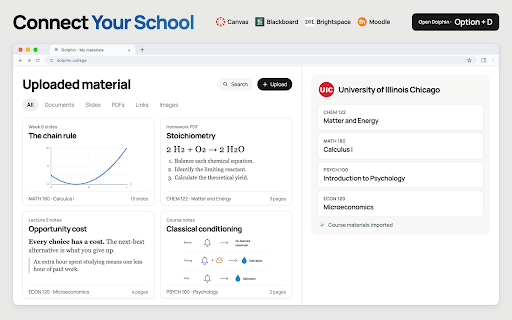
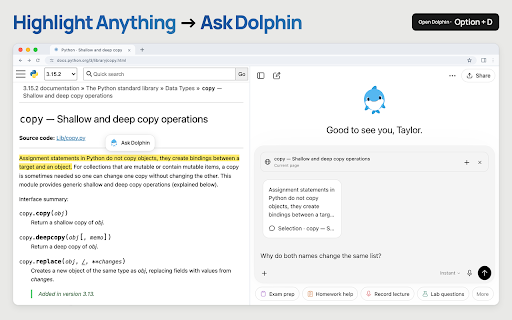
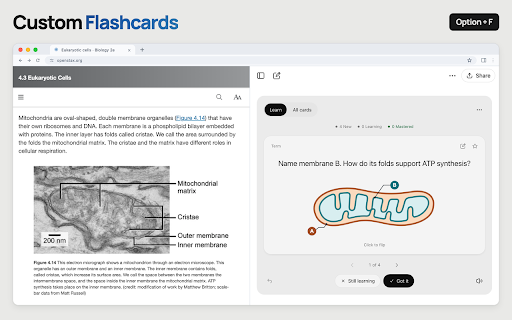
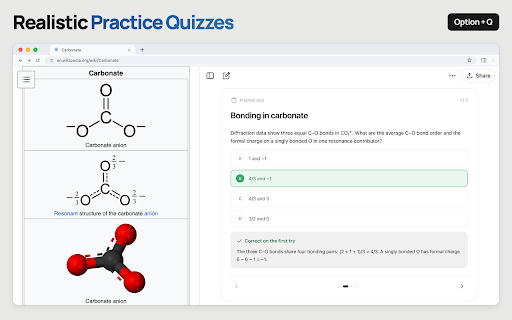
Dolphin is a Chrome extension for students that connects to Canvas to import course pages, assignments, and files. It provides a sidebar interface where users can ask questions about their study material, generate interactive flashcards, and create practice quizzes.

Developer:Dolphin
Version:0.5.6
Size:6.71MiB
Last updated:

Overview

Installs

1K+

Rating

★ 5.0

2 reviews

Languages

1 locales

Includes English

Market analysis

Review-backed positioning, friction, and market signals for this Chrome extension.

No review samples found

Macro category

AI & Writing Assistants

Pricing friction

Low review signal

Complaint intensity

Low review signal

Listing & review signals
Observed signals from store listing text and review samples.

Listing positioning

The product is positioned as an AI-powered study companion that integrates directly with Canvas. It emphasizes the ability to synchronize course materials and use AI to transform that content into active study aids like quizzes and flashcards.

Inferred product pattern

AI educational overlay for Learning Management Systems (LMS).

Review-backed pain points

Review-backed data is not available.

Observed feature gaps

Review-backed data is not available to identify gaps; listing currently focuses exclusively on Canvas integration.

Tags
Study AssistantCanvas IntegrationAI TutorEducation ToolCourse Management
Target users

- College students

- Canvas LMS users

- Academic learners

Primary use cases

- Generating practice quizzes from course material

- Creating AI-powered flashcards

- Summarizing and explaining complex academic passages

- Organizing Canvas course content in a side panel

Positive themes

- Review-backed data is not available

Negative themes

- Review-backed data is not available

Observed friction

- The listing states that free accounts have usage limits and paid plans are available for additional capacity.

Evidence boundary: Analysis based entirely on the public store listing description. No user reviews were available to validate claims or identify real-world pain points.
Complaint summaries
Review-backed complaint signals grouped by operational area.

Support

Review-backed data is not available.

Reliability

Review-backed data is not available.

Privacy

Review-backed data is not available.

Access & pricing

- Free entry with paid features

- Account required for core usage

- Limited free usage observed

Store listing facts

Listing assets

- Screenshots: 5

- Videos: 0

- Languages: 1

Trust signals

- Privacy policy

- Developer contact

- Support link

Store metadata

- Version: 0.5.6

- Size: 6.71MiB

- Last updated:

Listing SEO keywords

Search intent keywords
Keyword signals for evaluating how users may discover, compare, or search for this extension category.

Core discovery

Canvas AI assistantstudy tool for CanvasAI course material summary

Comparison

Dolphin vs QuizletDolphin vs Ankibest Canvas AI extensions

Problem

how to study for Canvas coursessummarize Canvas assignmentsmake flashcards from course files

Alternative

Canvas study helperAI academic assistantautomated quiz generator

Similar extensions

Jump to related discovery paths:

Screenshots

Dolphin: Study 4x faster screenshot

Links

Recommended Chrome extensions

Related listings from the same category, trending peers, and the same publisher portfolio.

Browse education
Revision History: Writing Process Visibility for Google Docs & Slides icon

Revision History: Writing Process Visibility for Google Docs & Slides

Revision History

Built for teachers: See how students write, not just what they wrote. View the writing process in Google Docs & Slides.

Installs

300K+

Rating

★ 4.1

Knowt: Quizlet Import, AI Notes & Flashcards icon

Knowt: Quizlet Import, AI Notes & Flashcards

Knowt

Automatically import flashcards and notes from any video, PDF, article, or flashcard site. Knowt is the fastest way to study.

Installs

200K+

Rating

★ 4.9

Mouse Tooltip Translator - PDF & Netflix YouTube dual subs icon

Mouse Tooltip Translator - PDF & Netflix YouTube dual subs

ttop324

Mouse Tooltip Translator translate mouseover text using google translate. Support OCR, TTS, manga translator & pdf translator.

Installs

200K+

Rating

★ 4.7

Paperpile Extension icon

Paperpile Extension

Paperpile

Collect, organize, annotate and cite your research papers in Chrome.

Installs

200K+

Rating

★ 4.1

Talk & Comment: Voice Feedback & Audio Comments for Teachers icon

Talk & Comment: Voice Feedback & Audio Comments for Teachers

TalkandComment.com

Leave voice feedback on student work in Google Docs, Classroom or any page. Share one link; students listen on their phone.

Installs

200K+

Rating

★ 4.0

Study Tools voor Magister icon

Study Tools voor Magister

QkeleQ10

Een extensie die verschillende aspecten van Magister verbetert en problemen ermee oplost.

Installs

200K+

Rating

★ 4.5

rikaikun icon

rikaikun

Erek Speed

rikaikun shows the reading and English definition of Japanese words when you hover over Japanese text in the browser.

Installs

200K+

Rating

★ 4.6

Reverso – Translation, dictionary icon

Reverso – Translation, dictionary

Reverso Technologies Inc.

Translate and learn languages while reading or watching movies online. It's free.

Installs

200K+

Rating

★ 4.0

Padlet Mini icon

Padlet Mini

engine

Collect and bookmark the best of the web for yourself or with friends.

Installs

200K+

Rating

★ 4.1

ExCITATION – Journal Ranking & Impact Factor for Google Scholar™ icon

ExCITATION – Journal Ranking & Impact Factor for Google Scholar™

Excitation Journal

Show SJR, ABS & ABDC journal rankings in Google Scholar. Sort by citations, detect predatory journals & preview abstracts — free.

Installs

200K+

Rating

★ 4.5