Page Marker Extension icon

Page Marker Extension Chrome Extension Analysis

Tab & Bookmark Productivity

Chrome extension ID: cellkdckoofbjfpelacpagofdpijhblh

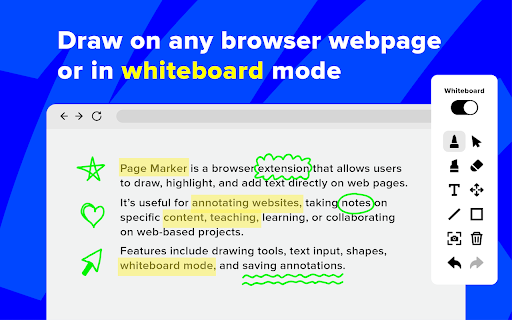
Page Marker is a browser extension that enables users to draw, highlight, and annotate web pages in real-time. It features a variety of tools including a pen, shapes, text, and a full virtual whiteboard mode.

Developer:Pavel
Version:1.0.2
Size:336KiB
Last updated:

Overview

Installs

4K+

Rating

4.9

51 reviews

Languages

52 locales

Includes Deutsch, English, Filipino, Indonesia...

Market analysis

Review-backed positioning, friction, and market signals for this Chrome extension.

Backed by review samples

Macro category

Tab & Bookmark Productivity

Pricing friction

Low review signal

Complaint intensity

Low review signal

Listing & review signals
Observed signals from store listing text and review samples.

Listing positioning

The product positions itself as a versatile website annotation tool that transforms any browser tab into a creative canvas. It emphasizes efficiency for professional and educational use cases such as meetings, tutorials, and brainstorming by allowing direct drawing on the browser chrome.

Inferred product pattern

A high-utility visual overlay tool designed for real-time interaction and markup of web-based content.

Review-backed pain points

Users noted that annotations on PDFs stay fixed to the screen position rather than the document content when scrolling, and requested more advanced text/design features similar to Canva.

Observed feature gaps

Advanced text customization tools and improved annotation anchoring for PDF documents.

Tags
Website AnnotationDigital WhiteboardScreen DrawingStudy Tool
Target users

- Students

- Teachers

- Journalists

- Researchers

- Meeting Facilitators

Primary use cases

- Annotating websites for research

- Online tutoring and math problem solving

- Brainstorming during virtual meetings

- Visualizing code reviews

- Creating simple video tutorials

Positive themes

- Supports stylus input and custom colors

- Persistence of customizations and markups after browser restarts

- Comprehensive toolset including shapes and whiteboard mode

- High ease of use for mathematical annotations

Negative themes

- Limited text formatting and design options

- UI popup menu is too large and lacks minimization

- PDF annotation anchoring issues during scrolling

Observed friction

- No pricing friction mentioned in the provided data.

Evidence boundary: Evidence extracted from store listing descriptions and user reviews highlighting feature satisfaction and specific usability limitations. Monetization and account requirements are not explicitly stated in the provided input.
Complaint summaries
Review-backed complaint signals grouped by operational area.

Support

No support or account complaints observed.

Reliability

No reliability complaints, though a specific behavior regarding PDF scrolling was noted.

Privacy

No privacy complaints observed.

Access & pricing

- No clear monetization signal

- No account requirement observed

- No clear pricing signal

Store listing facts

Listing assets

- Screenshots: 1

- Videos: 0

- Languages: 52

Trust signals

- Privacy policy

- Developer contact

Store metadata

- Version: 1.0.2

- Size: 336KiB

- Last updated:

Listing SEO keywords

Search intent keywords
Keyword signals for evaluating how users may discover, compare, or search for this extension category.

Core discovery

website annotation toolbrowser drawing extensiononline whiteboardscreen highlighter

Comparison

Microsoft JournalCanva

Problem

annotate websitedraw on screenbrowser pen

Alternative

screen markerweb whiteboardpage highlighter

Similar extensions

Jump to related discovery paths:

Screenshots

Page Marker Extension screenshot

Links

Recommended Chrome extensions

Related listings from the same category, trending peers, and the same publisher portfolio.

Browse education
Certificate Enrollment for ChromeOS icon

Certificate Enrollment for ChromeOS

google.com

Request a certificate for your device.

Installs

200K+

Rating

4.4

Add to Google Classroom icon

Add to Google Classroom

Canopy

This extension adds the current site to Google Classroom

Installs

200K+

Rating

4.2

Knowt: Quizlet Import, AI Notes & Flashcards icon

Knowt: Quizlet Import, AI Notes & Flashcards

Knowt

Automatically import flashcards and notes from any video, PDF, article, or flashcard site. Knowt is the fastest way to study.

Installs

100K+

Rating

4.9

Padlet Mini icon

Padlet Mini

engine

Collect and bookmark the best of the web for yourself or with friends.

Installs

100K+

Rating

4.2

Readlang Web Reader icon

Readlang Web Reader

readlang

Read websites in the language you're learning, translate words you don't know, and we'll create flashcards to help you remember.

Installs

100K+

Rating

4.3

Yomitan Popup Dictionary icon

Yomitan Popup Dictionary

yomidevs

Popup dictionary for language learning

Installs

100K+

Rating

4.8

Language Learning with Netflix & YouTube-AFL icon

Language Learning with Netflix & YouTube-AFL

App For Language

Language learning with Netflix: dual subtitles, YouTube support, AI mind maps & speaking coach for fast, fun progress.

Installs

100K+

Rating

3.9

Translate - Translator, Dictionary, TTS icon

Translate - Translator, Dictionary, TTS

uLanguage App

Accurate translate words, phrases and texts using Google Translate. Full page translator, dictionary and text to speech (TTS).

Installs

100K+

Rating

4.5

Dualsub - YouTube Subtitle Translator icon

Dualsub - YouTube Subtitle Translator

Dualsub Studio

Translate and display dual subtitles on YouTube and other video websites.

Installs

100K+

Rating

3.6

AnswerAI - Homework AI Tutor & Study Helper icon

AnswerAI - Homework AI Tutor & Study Helper

AnswerAI Team

Your AI assistant ChatGPT Plugin.Answer questions and get AI answers quickly,write emails,articles,chatbot,learning assistant.

Installs

100K+

Rating

4.9