Netflix 同時字幕で英語学習 icon

Netflix 同時字幕で英語学習 Chrome Extension Analysis

Niche Lifestyle & Gaming Hacks

Chrome extension ID: gibmkmmdicoffkhjkfimmjkojjopoagg

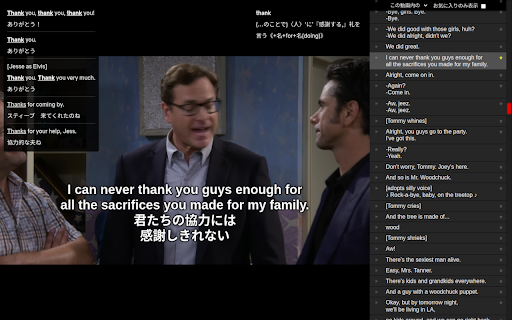
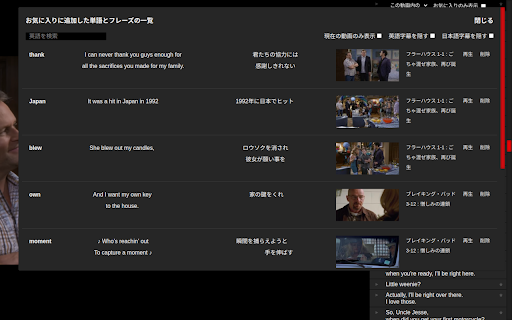
A Chrome extension that enables dual-language subtitles on Netflix. Key features include 3-second rewind, a pop-up dictionary for vocabulary, phrase repetition, playback speed adjustment, and a favorites list for saved phrases.

Developer:niko
Version:3.2.6
Size:2.04MiB
Last updated:

Overview

Installs

20K+

Rating

★ 4.2

71 reviews

Languages

1 locales

Includes 日本語

Market analysis

Review-backed positioning, friction, and market signals for this Chrome extension.

Backed by review samples

Macro category

Niche Lifestyle & Gaming Hacks

Pricing friction

High review signal

Complaint intensity

Moderate review signal

Listing & review signals
Observed signals from store listing text and review samples.

Listing positioning

The product is positioned as a comprehensive tool for learning English through Netflix. It emphasizes the utility of simultaneous subtitles, playback control for listening practice, and an integrated dictionary system.

Inferred product pattern

An overlay-based learning utility that modifies a third-party streaming platform's UI to facilitate language study.

Review-backed pain points

Users report critical issues with the payment system, including charges without service activation and difficulties canceling subscriptions. There are also reports of the UI failing to appear entirely after Netflix updates.

Observed feature gaps

Lack of support for non-English language pairs (e.g., cannot pair Japanese with Spanish), absence of phonetic symbols in the dictionary, and lack of pagination/management for large favorites lists.

Tags
Language LearningNetflix SubtitlesEnglish StudyDual SubtitlesDictionary Tool
Target users

- English language learners

- Japanese speakers studying English

- Netflix users

Primary use cases

- Improving English listening via movie/series repetition

- Vocabulary building using simultaneous subtitles

- Studying specific phrases and saving them for review

Positive themes

- Efficient keyboard shortcuts for navigation

- Convenient mouse-over dictionary functionality

- Useful playback speed controls for language acquisition

Negative themes

- Payment processing and billing errors

- UI breakage following Netflix platform updates

- Authentication failures during trial periods

Observed friction

- Payment required for meaningful usage

- Free-tier complaints detected

- Refund complaints detected

- Performance complaints detected

- Significant friction reported regarding the transition from Chrome Web Store payments to Stripe, with claims of funds being deducted without the license being granted.

Evidence boundary: Analysis based on the detailed version history in the store listing and 10 high-information reviews. Small review sample size; some dates in the version history are listed as 2026, which may be typos or internal markers.
Complaint summaries
Review-backed complaint signals grouped by operational area.

Support

Complaints regarding the inability to cancel recurring payments and non-functional user authentication buttons for the trial version.

Reliability

The extension's UI and functionality are prone to breaking when Netflix implements specification changes or AB tests.

Privacy

No specific privacy or security complaints observed in the provided data.

Access & pricing

- Subscription model observed

- Account required for core usage

- Trial or limited free usage before paid plan

Store listing facts

Listing assets

- Screenshots: 2

- Videos: 1

- Languages: 1

Trust signals

- Privacy policy

- Developer contact

- Official website

Store metadata

- Version: 3.2.6

- Size: 2.04MiB

- Last updated:

Listing SEO keywords

Search intent keywords
Keyword signals for evaluating how users may discover, compare, or search for this extension category.

Core discovery

Netflix dual subtitleslearn English with Netflixsimultaneous subtitles extension

Comparison

Netflix Dual subtitle for learning languages alternativebest Netflix language learning extension

Problem

how to show two subtitles on NetflixNetflix English and Japanese subtitles together

Alternative

Netflix subtitle learnerLanguage Reactor alternative

Similar extensions

Jump to related discovery paths:

Screenshots

Netflix 同時字幕で英語学習 screenshot

Links

Recommended Chrome extensions

Related listings from the same category, trending peers, and the same publisher portfolio.

Browse education
Netflix Dual subtitle for learning languages icon

Netflix Dual subtitle for learning languages

niko

Display two subtitle languages at the same time for language learning. Rewind to the start of phrases. Pause at the end of phrases.

Installs

20K+

Rating

★ 3.2

Wayground AI icon

Wayground AI

Wayground (formerly Quizizz)

AI-powered teaching, one click away!

Installs

100K+

Rating

★ 4.0

Zhongwen: Chinese-English Dictionary icon

Zhongwen: Chinese-English Dictionary

Christian Schiller

Great tool for learning Chinese. Includes links to Chinese Grammar Wiki. Supports adding words to Skritter.

Installs

100K+

Rating

★ 4.6

SolvelyAI - AI Homework Tutor &  Study Helper icon

SolvelyAI - AI Homework Tutor & Study Helper

cws-test-group-1

SolvelyAI is your AI Homework Helper—instant screenshot solving, step-by-step AI Answers, AI Summary, and Study Helper tools.

Installs

100K+

Rating

★ 4.7

Yomitan Popup Dictionary icon

Yomitan Popup Dictionary

yomidevs

Popup dictionary for language learning

Installs

100K+

Rating

★ 4.8

Language Learning with Netflix & YouTube-AFL icon

Language Learning with Netflix & YouTube-AFL

App For Language

Language learning with Netflix: dual subtitles, YouTube support, AI mind maps & speaking coach for fast, fun progress.

Installs

100K+

Rating

★ 3.9

Readlang Web Reader icon

Readlang Web Reader

readlang

Read websites in the language you're learning, translate words you don't know, and we'll create flashcards to help you remember.

Installs

100K+

Rating

★ 4.3

Transcript - AI Homework Helper icon

Transcript - AI Homework Helper

Transcript

Streamline your study experience with AI: Instant answers, deep insights, and personalized learning across subjects.

Installs

100K+

Rating

★ 3.3

Process Feedback - Writing Process Reports for Google Docs icon

Process Feedback - Writing Process Reports for Google Docs

Process Feedback

Free writing process reports for Google Docs · Students prove their own work · Teachers see edits, AI use, and copy-paste events

Installs

100K+

Rating

★ 5.0

Study Tools voor Magister icon

Study Tools voor Magister

QkeleQ10

Een extensie die verschillende aspecten van Magister verbetert en problemen ermee oplost.

Installs

100K+

Rating

★ 4.7