Aidify icon

Aidify Chrome Extension Analysis

Automation & Workflow Efficiency

Chrome extension ID: odaipdgfpakepciknhkgffehcioidecj

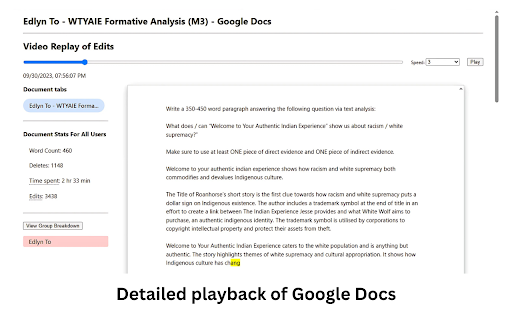
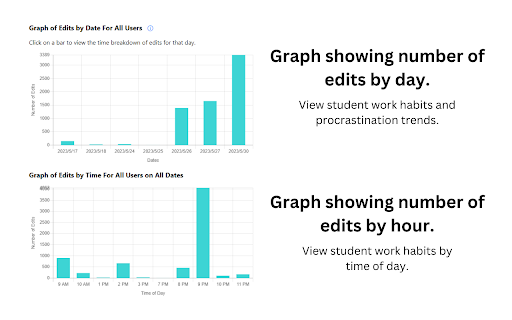
An extension that generates reports on Google Docs to track time spent, revision history, and individual contributions. It allows teachers to see a playback of edits to identify copy-paste behavior and verify the authenticity of student work.

Developer:to.edlyn
Version:2.02
Size:1.46MiB
Last updated:

Overview

Installs

5K+

Rating

4.7

17 reviews

Languages

1 locales

Includes English

Market analysis

Review-backed positioning, friction, and market signals for this Chrome extension.

Backed by review samples

Macro category

Automation & Workflow Efficiency

Pricing friction

Low review signal

Complaint intensity

Low review signal

Listing & review signals
Observed signals from store listing text and review samples.

Listing positioning

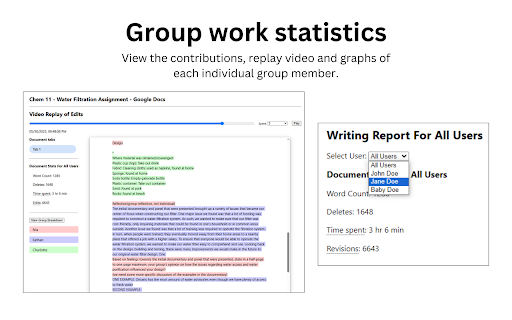
Aidify positions itself as a typing analytics tool for educators to evaluate the writing process rather than just the final result. It emphasizes verifying student effort, monitoring group contributions, and combating AI plagiarism through data and video playback.

Inferred product pattern

Academic integrity and provenance tool focusing on behavioral analytics over static content detection.

Review-backed pain points

One user found the GUI and data indicators less premium and comprehensive than GPT Zero; another user noted that the video playback speed is too slow for quick reviews.

Observed feature gaps

Lack of support for Google Slides; lack of adjustable/higher playback speed for edit history.

Tags
Writing AnalyticsAI Plagiarism DetectionEducation ToolGoogle Docs MonitorStudent Accountability
Target users

- Teachers

- Educators

- Students

Primary use cases

- Verifying student effort in writing assignments

- Monitoring individual contributions in group documents

- Identifying AI-generated content via copy-paste detection

- Tracking student time management

Positive themes

- Effective group work accountability

- Protection for students against false AI accusations

- User-friendly interface

- Valuable insights into the writing process

Negative themes

- Inferior data depth compared to GPT Zero

- Slow playback speed for reviewing edits

Observed friction

- No pricing information or friction observed in public data.

Evidence boundary: Analysis based on the official store listing and 10 sampled user reviews. Limited number of review samples available for sentiment distribution.
Complaint summaries
Review-backed complaint signals grouped by operational area.

Support

No support or account-related complaints observed.

Reliability

No reliability or performance failures reported, though one user requested faster playback.

Privacy

No privacy or security complaints observed.

Access & pricing

- No clear monetization signal

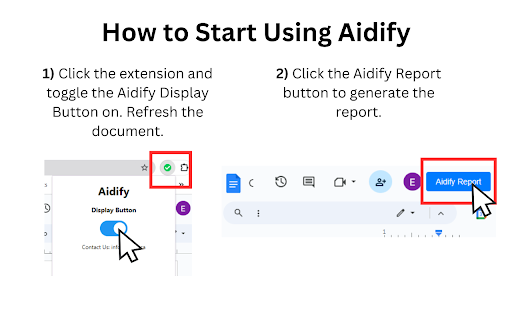
- Account required for core usage

- No clear pricing signal

Store listing facts

Listing assets

- Screenshots: 4

- Videos: 1

- Languages: 1

Trust signals

- Privacy policy

- Developer contact

- Official website

Store metadata

- Version: 2.02

- Size: 1.46MiB

- Last updated:

Listing SEO keywords

Search intent keywords
Keyword signals for evaluating how users may discover, compare, or search for this extension category.

Core discovery

Google Docs writing analyticsstudent effort trackerAI plagiarism verificationGoogle Docs edit history report

Comparison

Aidify vs GPT Zero

Problem

AI plagiarism in Google Docsunfair group work distributionfalse AI plagiarism accusations

Alternative

AI detectors for teacherswriting process monitorsplagiarism checkers

Similar extensions

Jump to related discovery paths:

Screenshots

Aidify screenshot
Aidify screenshot
Aidify screenshot
Aidify screenshot

Links

Recommended Chrome extensions

Related listings from the same category, trending peers, and the same publisher portfolio.

Browse education
Add to Google Classroom icon

Add to Google Classroom

Canopy

This extension adds the current site to Google Classroom

Installs

200K+

Rating

4.2

Knowt: Quizlet Import, AI Notes & Flashcards icon

Knowt: Quizlet Import, AI Notes & Flashcards

Knowt

Automatically import flashcards and notes from any video, PDF, article, or flashcard site. Knowt is the fastest way to study.

Installs

100K+

Rating

4.9

Padlet Mini icon

Padlet Mini

engine

Collect and bookmark the best of the web for yourself or with friends.

Installs

100K+

Rating

4.2

Readlang Web Reader icon

Readlang Web Reader

readlang

Read websites in the language you're learning, translate words you don't know, and we'll create flashcards to help you remember.

Installs

100K+

Rating

4.3

Yomitan Popup Dictionary icon

Yomitan Popup Dictionary

yomidevs

Popup dictionary for language learning

Installs

100K+

Rating

4.8

Language Learning with Netflix & YouTube-AFL icon

Language Learning with Netflix & YouTube-AFL

App For Language

Language learning with Netflix: dual subtitles, YouTube support, AI mind maps & speaking coach for fast, fun progress.

Installs

100K+

Rating

3.9

Translate - Translator, Dictionary, TTS icon

Translate - Translator, Dictionary, TTS

uLanguage App

Accurate translate words, phrases and texts using Google Translate. Full page translator, dictionary and text to speech (TTS).

Installs

100K+

Rating

4.5

Dualsub - YouTube Subtitle Translator icon

Dualsub - YouTube Subtitle Translator

Dualsub Studio

Translate and display dual subtitles on YouTube and other video websites.

Installs

100K+

Rating

3.6

AnswerAI - Homework AI Tutor & Study Helper icon

AnswerAI - Homework AI Tutor & Study Helper

AnswerAI Team

Your AI assistant ChatGPT Plugin.Answer questions and get AI answers quickly,write emails,articles,chatbot,learning assistant.

Installs

100K+

Rating

4.9

Pix Companion icon

Pix Companion

web-extensions

Browser extension for Pix

Installs

100K+

Rating

1.4